Fixing the App registration permission issues with the new Azure AD roles

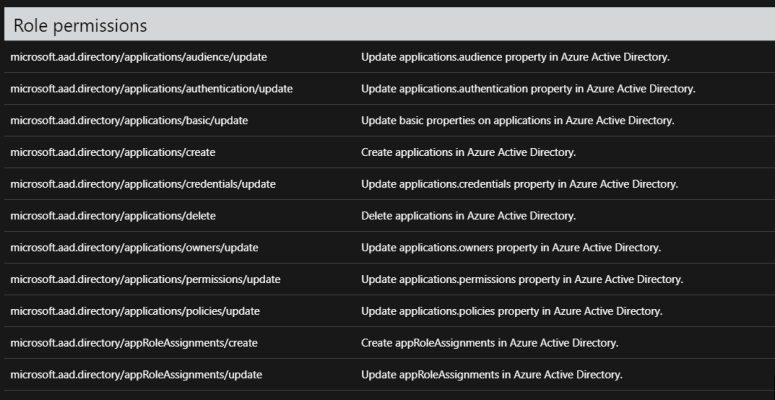
So I’ve been wanting to write about this for some time now.  For the longest time, I’ve managed our Azure AD.  The problem came in when it came to setting up new application registrations.  You needed entirely too powerful of permissions to set up these registrations.  It was a nightmare, because I found myself on calls setting up these registrations for no reason.  I asked a few folks at Ignite about this, and Microsoft assured myself and others that they were working on it.  The following Ignite ( This year) they released an update to Azure AD roles.


https://techcommunity.microsoft.com/t5/Azure-Active-Directory-Identity/Hallelujah-Azure-AD-delegated-application-management-roles-are/ba-p/245420

I am not even entirely sure you can understand how painful this was as a Directory architect.   Having the ability to selectively allow people to create applications registrations allows me to automate so many workflows.


Good job Microsoft


approles

Reviewing the Services Hub

Recently my company moved from the paid per service that Microsoft offers into the Service Hub model.  I have to tell you, I am very impressed so far.

One of the biggest challenges we had before, was it was never really clear between large organizations who had the ability to open cases.  The services hub fixes all of that by making it far more transparent.  You also get the ability to review contracts, check on all other cases that are open.

I’ve also learned that the learning videos and assessment stuff that Microsoft use to charge for now is included free.  If your organization is thinking about going with the services hub, I highly recommend it.


services

Teams to be included in all O365 Business installs

Currently, Microsoft Teams is a separate installation from Office 365 Business. But, starting in January 2019, Teams will be installed by default for new installations of Office 365 Business, starting with Version 1901.

I saw this on twitter this morning and I thought it was really interesting. I’ve written before about how I think the O365 stack wins when you put it up against other individual technologies.  It seems apparent that Microsoft see this as well.  Good stuff.

Mobile Edge Browser

edge!


I have no idea why MS keeps pushing the Edge browser, never mind pushing it on mobile device.  I admit, it is pretty fast and functional on PC.  I can’t understand the logic behind why you think making it work on a Mobile Device would be something anyone would be remotely interested in.

From Microsoft

New Microsoft Edge browser settings for Windows 10 and later


This update includes new settings to help control and manage the Microsoft Edge browser on your devices. For a list of these settings, see Device restriction for Windows 10 (and newer).


New apps support with app protection policies


You can now manage the following apps with Intune app protection policies:


  • Stream (iOS)
  • To DO (Android, iOS)
  • PowerApps (Android, iOS)
  • Flow (Android, iOS)


Use app protection policies to protect corporate data and control data transfer for these apps, like other Intune policy managed apps. Note: If Flow is not yet visible in the console, you add Flow when you create or edit and app protection policies. To do so, use the + More apps option, and then specify the App ID for Flow in the input field. For Android use com.microsoft.flow, and for iOS use com.microsoft.procsimo.


So I guess Intune requires macOS 10.12

From Microsoft

Intune requires macOS 10.12 or later

Intune now requires macOS version 10.12 or later. Devices using prior macOS versions can’t use the Company Portal to enroll into Intune. To receive support assistance and new features, users must upgrade their device to macOS 10.12 or later and upgrade the Company Portal to the latest version.

Well I was messing around with my Intune lab this morning, I guess you need to have macOS 10.12 now.  I assume this has something to do with JAMF.

Good on you for staying up to date MS.