Could BlackBerry be turning the page?

BlackBerryLive

I was reading up on BlackBerry live news this morning and I stumbled upon this important tidbit. BlackBerry set sales records in the UK and in Canada when it launched. Now assuming this is true, this is really good news for RIM.  As I wrote earlier, RIM is definitely hurting in the marketplace right now, and any good news helps.  This time last year at BlackBerry world, I met with some very high profile customers who were talking about plans to move off of BlackBerry and BES.  In the past few months, I’ve heard plans of implementing BES 10 ( which is the sudo-BES for BlackBerry 10 devices) along with their stand alone MDM solution

Could BlackBerry be part of MDM solutions going forward, we will see…

My first WES…..

WES

I remember the first time I went to WES, now BlackBerry live ( also called BlackBerry world, and BlackBerry user conference).  I met so many people that I had met through different online avenues.  It was a magical place, and at the time BlackBerry were the kings of the hill.  The late night parties, the technical sessions, meeting RIM developers and so much more.  It was  very worth every penny that my company spent on it.  This year, I had a dilemma, with BlackBerry’s recent dealing’s, and no real announcements to speak of, I had to decide on if it would be worth it.  I’m in the middle of working on a pretty large deployment for a new customer over in London.  So I passed on BlackBerry live.  So I sit here, on the side lines, waiting like everyone else to see what comes next.  For the past 7 years, I’ve been involved with RIM, both as a user and a BlackBerry engineer.  I’ve done hundreds of BES upgrades, spoken to RIM about several technical challenges and just met some amazing people along the way.  If I had to sum up all the feelings I’ve had for RIM over the last few years I would just say this.  The good times didn’t have to stop, but you chose to let them.  You did not innovate.

I was in attendance last year at BlackBerry world, and I listened to the speeches, the promises and the very weak demo of BB10. (BTW that was a video, if it wasn’t a video then why wouldn’t he show us any of the features that we were promised)I found myself getting very mad listening to Hein’s speak.  I’m sick of demo’s, I’m sick of promising my customers to wait.  I want something now.  Then about 6 months later, I finally got my hands on one.  I’ve been using a Z10 for about a month and a half now, as my only device. Besides the lack of applications, I will say that I am very impressed.  I love the typing, I love BlackBerry hub, and the internet experience is light years above the competition.  My only question is, why did this take 3 years to come out.  I still feel like BlackBerry missed the boat…

Worldwide Mobile Phone Sales to End Users by Vendor in 2012 (Thousands of Units)

Company

2012

Units

2012 Market Share (%)

2011

Units

2011 Market Share (%)

Samsung

384,631.2

22.0

315,052.2

17.7

Nokia

333,938.0

19.1

422,478.3

23.8

Apple

130,133.2

7.5

89,263.2

5.0

ZTE

67,344.4

3.9

56,881.8

3.2

LG Electronics

58,015.9

3.3

86,370.9

4.9

Huawei Technologies

47,288.3

2.7

40,663.4

2.3

TCL Communication

37,176.6

2.1

34,037.5

1.9

Research In Motion

34,210.3

2.0

51,541.9

2.9

Motorola

33,916.3

1.9

40,269.1

2.3

HTC

32,121.8

1.8

43,266.9

2.4

Others

587399.6

33.6

595886.9

33.6

Total

1,746,175.6

100.0

1,775,712.0

100.0

I guess the real reason I’m writing this, is I really hope I won’t have to say one day “I missed the last BlackBerry conference”

FSMO Roles

Flexible single master operation or operations master

Strange, I work regularly with these roles, but after being asked the other day what they stood for, I had no idea.

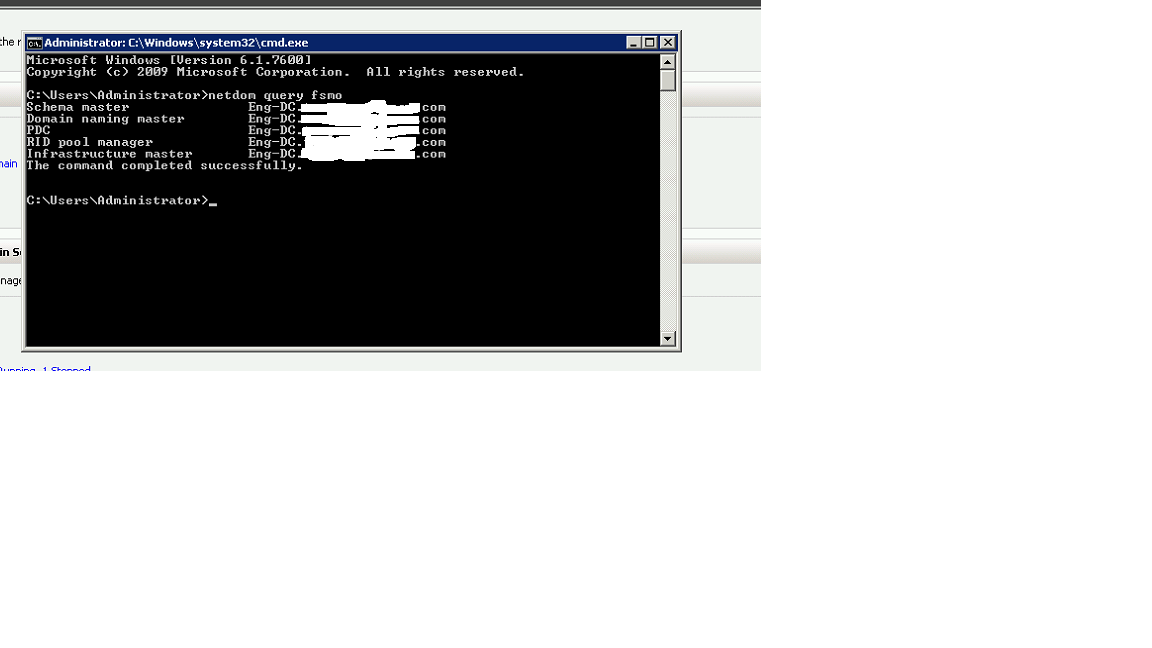
Lets start by taking a look at what FSMO roles you have, install the Support Tools from the \Support\Tools folder on your product CD and type netdom query fsmo at a command prompt and you should get something like this.

ss1dos

By Default, all the FSMO roles will be installed on the first domain controller in your forest.  When you install the first DC of any other domain in your forest, that DC will hold all three domain FSMO roles (PDC Emulator, RID Master, and Infrastructure Master).

1. Forest Roles

  • Schema Master – As name suggests, the changes that are made while creation of any object in AD or changes in attributes will be made by single domain controller and then it will be replicated to another domain controllers that are present in your environment. There is no corruption of AD schema if all the domain controllers try to make changes. This is one of the very important roles in FSMO roles infrastructure.
  • Domain Naming Master – This role is not used very often, only when you add/remove any domain controllers. This role ensures that there is a unique name of domain controllers in environment.

2. Domain Roles

  • Infrastructure Master – This role checks domain for changes to any objects. If any changes are found then it will replicate to another domain controller.
  • RID Master – This role is responsible for making sure each security principle has a different identifier.
  • PDC emulator – This role is responsible for Account policies such as client password changes and time synchronization in the domain

Why you should never change the name of your mailbox server, ever.

I recently had the pleasure of dealing with a customer who renamed their Exchange mailbox servers, and the pains that went along with it.  The obvious thing here is, you should never be renaming your Exchange mailbox servers, and I will attempt to explain why.  The first thing to realize is that Active Directory is liberally populated with references to an Exchange server name.  These are everywhere in Active Directory, so when you make this change, there is a good chance (100% certainty) that AD will not populate these changes to all the users.  So why is this a big deal?  Those settings in AD are the configurations that we use every single day.  When you make a change to the object that active directory references, AD has no way knowing the new name of the object.  This can cause you HUGE problems going forward with things like Remote-Powershell, Directory services, Calender delegates and many other LDAP objects.

APNS Isues

It looks like Apple is having issues this morning with their APNS portal. I have heard scattered reports about users not being able to enroll new IPhones.


**Update this has been resolved.

Setting up remote power shell from different domains

So I have had the pleasure (sarcasm, massive amounts of sarcasm) in dealing with remote power shell in the last couple of days  So I figured I would write a quick guide on how you can connect to another machine, outside of your domain, with remote Power shell.  This is useful if you want to run Exchange cmdlets from your local machine, run tests on your local power shell instance while connecting to a test lab, or countless other ways.  First lets talk about remote power shell, and what it is.

Remote power shell is a tool that allows you to remotely managed services using WS-Management protocol and the Windows Remote Management (WinRM) service.    The WS-Management protocol is a public standard for remotely exchanging management data with any computer device that implements the protocol. The WinRM service processes WSMan requests received over the network. It uses HTTP.sys to listen on the network.

In my test scenario, I am trying to connect to my test lab (testlab.com) with remote powershell, from my work machine (workdomain.com)  The first problem that I am going to come across is that my machines are in different domains, and we are not going to be able to create a trust between them.  I found a great KB that walked me through the actual technical piece.

I have listed those steps here


1. Start Windows PowerShell as an administrator by right-clicking the Windows PowerShell shortcut and selecting Run As Administrator.

2. The WinRM service is confi gured for manual startup by default. You must change the startup type to Automatic and start the service on each computer you want to work with. At the PowerShell prompt, you can verify that the WinRM service is running using the following command:
get-service winrm
The value of the Status property in the output should be “Running”.

3. To configure Windows PowerShell for remoting, type the following command:
Enable-PSRemoting –force

In many cases, you will be able to work with remote computers in other domains. However, if the remote computer is not in a trusted domain, the remote computer might not be able to authenticate your credentials. To enable authentication, you need to add the remote computer to the list of trusted hosts for the local computer in WinRM. To do so, type:
winrm s winrm/config/client ‘@{TrustedHosts=”RemoteComputer”}’
Here, RemoteComputer should be the name of the remote computer, such as:
winrm s winrm/config/client ‘@{TrustedHosts=”CorpServer56″}’


A few problems that I came across.

  1. Even after adding the machine to the trusted hosts, you still get the same errors inside power shell that says unable to connect.  Make sure you are running power shell as an administrator
  2. Make sure you can ping and telnet the ports you are using
  3. Make sure that if your going over HTTP that the server your connecting to has the turned on, for example,if your going to connect to an Exchange server for remote power shell, make sure that IIS directory allows connections on port 80

 

In 20 or 30 yea…

In 20 or 30 years, you’ll be able to hold in your hand as much computing knowledge as exists now in the whole city, or even the whole world.

It is such a crazy world we live in, today I have been troubleshooting my brother’s 32GB SD card.  Think about that for a second, I am holding a 32 GB SD card, that 20 years ago, wasn’t even possible to create in such small space.  The miracles of technology.

Citrix and Zenprise

I’ve had the pleasure of speaking to the team over at Zenprise a couple of times at BlackBerry world (formerly WES) a few years ago, and I was very impressed with their product. Recently, Citrix bought Zenprise.  The obvious reason that Citrix is doing this is to get into the MDM game, in technology cash is king usually and Citrix just decided it wants to become a player.  I am curious as to why they didn’t buy MobileIron or Airwatch, maybe the asking price was too much.  I’ve always though Zenprise was feature rich, but behind the big two.  We’ll have to wait to see how this plays out.  I think one of the reasons that the MDM market is going to become saturated very quickly, is because it is incredibility painful to move off an MDM solution. Think about it for a moment, let’s say your doing an email migration from Domino to Exchange, you at least have control over the software on the computer’s your moving to. In MDM, you have to remove applications from sometimes several hundred devices, re-enroll Iphones, Androids and reconfigure connections to the BlackBerry servers.  Never mind the hundreds of hours it takes to work with all your users.  The lesson here, Be very sure you choose the correct MDM vendor

BDS 6.2

BlackBerry 10 policy guide.

So I’ve been reviewing the BlackBerry 10 policy guide, and it looks like the current version, 6.2 has added the IT policy rules.

They have also published a datasheet for Android and iOS

iOS and Android Datasheet