
Your App Secrets Are Naked (and eBPF Knows It)

Let’s talk about something that’s both cool and slightly terrifying: using eBPF to watch socket syscalls before your fancy encryption kicks in. Yeah. You know that HTTPS request you were so proud of? The one that uses TLS and keeps your users “safe”? eBPF saw the plaintext before TLS even had a chance to clear its throat.

Wait, what?

At the syscall level — right at the edge of kernelspace — there’s a tiny window where everything your app says is still in cleartext. It hasn’t hit OpenSSL yet. It hasn’t been base64’d, hex’d, gzip’d, or otherwise obfuscated. It’s just sitting there, raw and readable.

That’s where this eBPF program jumps in with its metaphorical notebook and says, “Oooh, what’s this? Looks like a GET request to /secrets with a bearer token, neat.”

So what’s actually happening?

This program hooks into the connect, accept, read, write, etc. syscalls. When your app makes a socket connection and starts sending data, it snags the buffers. Literally — it reads the message you’re about to send, before any encryption, because you haven’t even handed it to the TLS library yet.

Want to fingerprint HTTP headers? Easy. Want to detect TLS handshakes? Sure — it even looks for ClientHello. Want to build a creepy little audit trail of who sent what where, with process info and directionality? Done.

Why does this matter?

Because most developers — and honestly, a lot of ops/security folks — think “I’m using HTTPS” is a full-stop safety guarantee.

But with kernel-level observability like this, HTTPS is a magician’s act that starts after the rabbit’s already out of the hat. The kernel saw the rabbit. The kernel can tell you the rabbit’s name, the address it was going to, and the hand that threw it.

So if you’re running sensitive apps (think login forms, auth tokens, secrets in HTTP headers — don’t lie, I’ve seen it), and you think encryption is a bulletproof cloak, just remember: anything you send before TLS gets its act together is up for grabs.

Is it useful? Absolutely.

Is it powerful? Wildly.
Should we maybe… pump the brakes on how much introspection we’re doing from inside the kernel? Yeah, probably.

Because the moment we say “sure, just parse app-layer data in-kernel,” we’re blurring the line between trusted computing base and trusted surveillance platform.

TL;DR

Encryption is great. But it starts after the syscall.
eBPF runs at the syscall.
So… yeah. Your secrets might be showing.

Building a Universal Auth Middleware for SaaS: Solving the Fragmented Authentication Problem

The Problem: SaaS Authentication Fatigue

As someone who uses dozens of SaaS products daily, I’m frustrated by the inconsistent authentication options across platforms. Some support Google OAuth but not GitHub. Others offer SAML but only for enterprise plans. Many still rely solely on email/password. This fragmentation creates:

  • Security headaches – Maintaining different credentials everywhere
  • User experience nightmares – Constant password resets and auth flows
  • Admin overhead – Managing SSO across multiple providers

The Vision: A Universal Auth Middleware

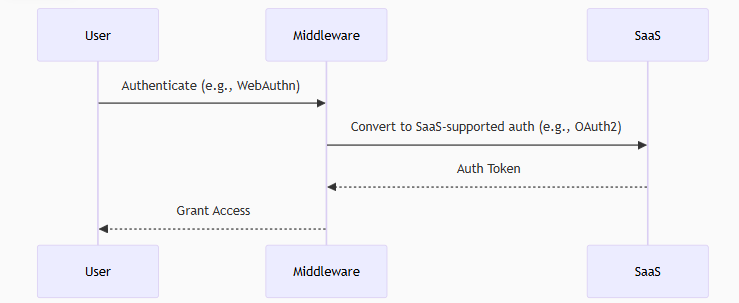
I want to build a middleware server that sits between users and SaaS applications, handling authentication seamlessly. Here’s how it would work:

  1. You authenticate with the middleware using your preferred method (WebAuthn, GitHub OAuth, SAML, etc.)
  2. The middleware authenticates to the SaaS on your behalf using whatever method the SaaS requires
  3. You get access without worrying about the SaaS’s auth limitations

Key Features

  • Multi-protocol support: Accept modern auth (OIDC, WebAuthn) and convert to whatever backend needs
  • Credential mapping: Your GitHub identity becomes the right format for each SaaS
  • Centralized control: One place to manage all your SaaS access
  • Protocol translation: Turn your FIDO2 hardware key into OAuth tokens for services that don’t support WebAuthn

Why This Matters

  1. User Experience: Never see “sign in with Google” again when you prefer GitHub
  2. Security: Enforce consistent MFA policies across all services
  3. Privacy: Control what personal info gets shared with each SaaS
  4. Future-proofing: Add new auth methods once to the middleware, not across all services

Technical Approach

The initial architecture would include:

  • Auth protocol adapters (OAuth2, SAML, WebAuthn, etc.)
  • Credential mapping engine
  • Token translation layer
  • Policy engine for access control

Next Steps

I’m planning to:

  1. Build a prototype supporting 2-3 auth methods and 1-2 SaaS backends
  2. Open source the core components
  3. Create plugins for common SaaS platforms

Observing the Wire: A Deep Dive into socket.bpf.c and eBPF-Based Socket Tracing

eBPF has been a powerful tools in the Linux kernel, offering safe and programmable hooks into low-level system behavior. I spent tonight reading about Qpoint. I dove deep into the socket.bpf.c file on their Git to understand how the QPoint is using eBPF to trace socket-level activity across the lifecycle of a connection. It monitors socket creation, data transmission, and teardown, while offering protocol-aware introspection—all from inside the kernel.

This is not just packet inspection. This is process-aware, syscall-correlated telemetry that bridges the user/kernel boundary with precision and intent.

What This Code Does

At its core, this eBPF program attaches to key syscall tracepoints (connect, accept, sendto, recvfrom, read, write, close, and others) and captures metadata and data buffers associated with socket usage. The major components include:

Socket Type Inference: At the sys_socket entry point, the code captures the domain, type, and protocol and stores it for use after the syscall returns.

Address and Connection Tracking: For syscalls like connect() and accept(), the destination or client address is captured and stored in per-FD maps. These addresses are then used to create per-connection identity tuples based on PID, FD, and time.

Data Path Inspection: As data flows through read, write, readv, writev, and their UDP counterparts, this code captures initial buffers—typically to fingerprint protocols like HTTP, TLS, or DNS—and submit structured events to a ring buffer.

TLS Detection: There’s a built-in handshake parser that looks for the ClientHello message to identify SSL traffic. TLS sessions are flagged and handled differently from plaintext traffic.

Process-Aware Filtering: Processes can be ignored dynamically via strategy maps (QP_IGNORE, QP_FORWARD, etc.), allowing selective inclusion or exclusion of connections based on runtime configuration.

Directional Filtering: The code differentiates between ingress and egress, loopback, internal vs. external traffic, and even proxies or management endpoints—giving the observer fine-grained control over what’s reported.

Design Strengths

  • Kernel-resident efficiency: There’s no context switching overhead once the program is loaded. Everything is collected in-place, using verifier-safe memory access patterns and bounded loops.
  • Structured telemetry: Events are explicitly typed (S_OPEN, S_DATA, S_CLOSE, S_PROTO, etc.) and correlated with per-connection state, offering clean semantics when consumed in user space.
  • Protocol awareness: Unlike netfilter or raw packet sniffers, this code attempts to interpret the meaning of a connection—protocol, direction, and usage pattern—rather than just its headers.

While the implementation is technically sound, it raises deeper questions about Linux’s trust model and kernel-user space boundaries.

This code captures application-level data buffers at syscall entry and exit points, before encryption or masking occurs in user space. It can fingerprint plaintext HTTP requests, detect SSL handshakes, and correlate traffic with process metadata. While extremely powerful for observability and security tooling, this also opens the door to surveillance.

The kernel, historically, has not been a place for application-layer parsing. Doing so, even with the verifier’s constraints, represents a shift from a minimal trusted computing base to something more introspective—and potentially overreaching.

  • What happens if this code misinterprets a protocol and causes false alerts?
  • Should all eBPF observers be allowed to inspect TLS handshakes by default?
  • Is it acceptable for an eBPF program to associate application data with PIDs and expose it externally?

These are not technical limitations—they’re design tradeoffs that need to be weighed carefully.

socket.bpf.c is a technical achievement. It showcases the full breadth of what modern eBPF tooling can do: real-time, low-overhead, semantically rich observability. But it also pushes on boundaries that Linux has historically tried to avoid—specifically, embedding high-level visibility logic in kernelspace.

The ability to introspect application behavior with this fidelity is powerful. But as with all power at the kernel level, it demands discipline, context-awareness, and a strong ethical hand.

Rotating Client Secrets

Rotating Snowflake OAuth Client Secrets: Why and How

If you’re using OAuth to connect applications to Snowflake, you’re likely storing a client ID and secret in your app or a secure store. But here’s the kicker—OAuth secrets aren’t forever. Whether it’s a security best practice or a compliance mandate, rotating these secrets regularly is essential.

In this post, I’ll walk you through why rotating Snowflake OAuth client secrets matters and how to do it without causing downtime or breaking your integration.


Why Rotate OAuth Secrets?

OAuth secrets are like passwords for applications. If compromised, attackers can impersonate your app. Common reasons to rotate:

  • Secrets are long-lived and may have leaked.
  • You’re transferring ownership of the app.
  • Compliance requires periodic rotation (ISO 27001, SOC2, etc.).
  • You want to tighten the blast radius of any potential breach.

Where OAuth Secrets Live in Snowflake

When you register an OAuth integration in Snowflake, you use a SQL command like:

CREATE SECURITY INTEGRATION my_oauth_integration
  TYPE=OAUTH
  ENABLED=TRUE
  OAUTH_CLIENT = CUSTOM
  OAUTH_CLIENT_TYPE='CONFIDENTIAL'
  OAUTH_CLIENT_SECRET='your-secret-here'
  ...

That OAUTH_CLIENT_SECRET is stored inside Snowflake and used during token validation. You can update it anytime using ALTER SECURITY INTEGRATION.


Rotation Strategy: Dual Phase

Here’s a safe process to rotate the OAuth secret without downtime:

Step 1: Generate a New Secret

Use your IdP (e.g., Okta, Azure AD, Ping) or OAuth provider to generate a new client secret. Make sure the new one doesn’t override the old one just yet—many providers support multiple active secrets.

Step 2: Update the Snowflake Integration

Run:

ALTER SECURITY INTEGRATION my_oauth_integration
  SET OAUTH_CLIENT_SECRET = 'new-secret';

Tip: Do this before expiring the old secret at your IdP.

Step 3: Update Client Applications

Update your apps or middleware to use the new client secret. This may involve:

  • Updating secrets in a vault (AWS Secrets Manager, Azure Key Vault, HashiCorp Vault)
  • Redeploying apps that store secrets in environment variables

Step 4: Remove the Old Secret from the IdP

Once everything is working and tokens are being issued with the new secret, revoke the old secret from your OAuth provider.

Automate It

If you’re using infrastructure-as-code or secret rotation tools, consider automating the process:

  • Use a CI/CD pipeline with secure variables
  • Trigger secret regeneration from your IdP API
  • Use Vault’s dynamic secrets or Secrets Manager rotation logic
StepAction
1Generate new client secret
2Update Snowflake integration
3Update applications to use new secret
4Revoke the old secret from your IdP

.

Don’t Put Secrets in Code: A Beginner’s Guide to Doing It Right

Let’s be clear from the start: don’t put secrets in your code. That means no passwords in your .py files, no API keys hardcoded in your front-end, and definitely no database credentials tucked inside a GitHub repo. This is the kind of mistake that leads to security breaches, unexpected bills, and a lot of apologizing to your security team.

What Are “Secrets”?

“Secrets” are sensitive data like:

  • API keys
  • Database passwords
  • Encryption keys
  • OAuth tokens
  • Cloud access credentials

These are meant to be tightly controlled — not scattered across your source code or exposed in version control.

Why You Don’t Put Secrets in Code

  1. Security: Anyone with access to your code has access to your secrets. That includes your Git history and CI logs.
  2. Auditability: It’s hard to know who accessed what and when if secrets are just floating in the repo.
  3. Rotation: Changing secrets becomes a nightmare when you have to update every reference across multiple codebases.

So Where Do You Put Them?

You use a secrets manager — a service specifically designed to store and retrieve sensitive information securely. Here are three popular examples:

AWS Secrets Manager

AWS Secrets Manager lets you store and automatically rotate secrets like database credentials and API keys. You retrieve them programmatically like this:

import boto3

client = boto3.client('secretsmanager')
secret_value = client.get_secret_value(SecretId='prod/db-password')

That SecretId stays in your code — not the secret itself.

Azure Key Vault

Azure Key Vault allows you to store keys, secrets, and certificates in a secure way. You access secrets like this:

from azure.identity import DefaultAzureCredential
from azure.keyvault.secrets import SecretClient

vault_url = "https://<your-vault-name>.vault.azure.net/"
client = SecretClient(vault_url=vault_url, credential=DefaultAzureCredential())

secret = client.get_secret("MySecretName").value

Again — no secrets in code, just identifiers.

HashiCorp Vault

Vault by HashiCorp provides advanced capabilities like dynamic secrets and access policies. Here’s a simple example in Python using the HVAC client:

import hvac

client = hvac.Client(url='https://vault.example.com', token='VAULT_TOKEN')
secret = client.secrets.kv.v2.read_secret_version(path='apps/payment')['data']['data']

Even better: you can authenticate with a token or AppRole, and rotate secrets on a schedule.

Why I’m Done Pretending LinkedIn Still Matters

Remember when LinkedIn was about professional networking? When people actually shared insights, job tips, or useful posts about career growth? Yeah. That version of LinkedIn is dead.

Now? It’s a cringe factory of humblebrags, AI-generated inspiration posts, fake promotions, and “thought leaders” giving advice they’ve never taken themselves.

Got laid off? Expect 400 bots and recruiters who never follow up to like your post. Got a new job? Suddenly everyone’s a career coach. God forbid you scroll the feed — it’s a wasteland of engagement farming, people oversharing trauma for likes, and the same recycled “I was rejected 30 times before I became CEO” nonsense.

It’s not a professional network anymore. It’s Facebook in a suit. A place where real connections are buried under layers of fluff, vanity metrics, and people who call themselves “visionaries” because they reposted a Gary Vee quote.

LinkedIn could be great. It was very good. But somewhere along the way, it sold out for engagement. And what we’re left with is a platform pretending to be professional, while everyone treats it like Instagram for their resume.

End rant.
#NotSorry #DoBetterLinkedIn

Terraform + Redshift: Automating Data Warehouse Deployments (and a Few Fun Tricks Along the Way)

As a cloud architect, I’ve seen more teams lean into Infrastructure as Code (IaC) to manage their data platforms, and AWS Redshift is no exception. With Terraform, you can spin up entire Redshift environments, configure VPC networking, IAM roles, and security groups, and even automate user/role creation.

But this post isn’t just a dry walk-through. I’ll show you how to wire it all up and then share a few fun Redshift features I stumbled across that might make your SQL life more enjoyable (or at least more tolerable).

Why Use Terraform with Redshift?

AWS Redshift is powerful, but the console setup process is… less than ideal. Terraform fixes that.

Benefits of Terraforming Redshift:

Repeatability: One config file to rule them all. Version control: Track changes in Git. Modularity: Use reusable Terraform modules to deploy clusters in dev, staging, or prod. Security: Define IAM roles and permissions declaratively, without manual error.

Quickstart: Provisioning a Redshift Cluster

Here’s a super basic example:provider "aws" { region = "us-east-1" } resource "aws_redshift_cluster" "main" { cluster_identifier = "my-redshift-cluster" database_name = "analytics" master_username = "admin" master_password = "YourSecurePassword1" node_type = "dc2.large" cluster_type = "single-node" publicly_accessible = false iam_roles = [aws_iam_role.redshift_role.arn] } resource "aws_iam_role" "redshift_role" { name = "redshift-role" assume_role_policy = jsonencode({ Version = "2012-10-17", Statement = [{ Action = "sts:AssumeRole", Effect = "Allow", Principal = { Service = "redshift.amazonaws.com" } }] }) }

This gets you a one-node cluster with IAM integration. From here, you can bolt on everything from VPC routing to monitoring and logging.

Terraform + SQL = A Beautiful Workflow

Once your cluster is live, it’s time to automate SQL scripts too. Use local-exec or integrate your Terraform pipeline with something like Flyway, Liquibase, or just a simple script that runs psql or Redshift Data API commands after provisioning.

Fun Redshift/PostgreSQL Functions

Terraform is great, but let’s not forget why you’re here—SQL wizardry.

Here are a few Redshift functions or features that are surprisingly useful (and occasionally delightful):

1. LISTAGG – String Aggregation in a Single RowSELECT department, LISTAGG(employee_name, ', ') WITHIN GROUP (ORDER BY employee_name) AS team FROM employees GROUP BY department;

Great for showing comma-separated team members by department.

2. GENERATE_SERIES – Fake Data for Free

Redshift doesn’t support this natively like Postgres, but you can emulate it:WITH RECURSIVE series(n) AS ( SELECT 1 UNION ALL SELECT n + 1 FROM series WHERE n < 100 ) SELECT * FROM series;

Useful for faking time ranges, populating calendars, etc.

3. PERCENTILE_CONT – Smooth Distribution MetricsSELECT PERCENTILE_CONT(0.5) WITHIN GROUP (ORDER BY salary) AS median_salary FROM employees;

Yes, you can finally stop explaining why AVG() isn’t the same as the median.

4. STL_SCAN & SVL_QUERY_REPORT – Query-Level Insight

Want to know how Redshift is scanning your data? These internal system views are gold for optimization.

Wrap Up

Terraform lets you take control of Redshift the same way you manage EC2, S3, or RDS. It’s scriptable, testable, and repeatable—which is exactly what you want when managing a data warehouse that powers business decisions.

And once you’re live, remember: Redshift has a few SQL tricks up its sleeve. Dig into its PostgreSQL heritage, and you’ll find some gems that make analytics more fun—or at least more tolerable at 3 AM when you’re debugging a query.

If you’re already Terraforming Redshift and have a favorite function or optimization tip, drop it in the comments. Or better yet—let’s turn it into a module.

Hardening Snowflake Access

While Snowflake provides strong default security capabilities, enterprises must take additional steps to lock down the identity and access layer to prevent unauthorized data access. In this article, we focus on front-end hardening, including authentication mechanisms, federated identity controls, network access constraints, and token lifecycle management. The goal is to ensure that only the right identities, coming from the right paths, under the right conditions, ever reach Snowflake.

Snowflake supports SAML 2.0 and OAuth 2.0-based SSO. You should disable native Snowflake usernames/passwords entirely for production accounts.

SAML (Okta, Azure AD, Ping)

  • Create an enterprise application in your IdP.
  • Configure SAML assertions to pass custom attributes like role, email, department.
  • Use SCIM provisioning to sync Snowflake users/roles/groups from the IdP.
  • Set the session timeout in your IdP lower than Snowflake’s to avoid dangling sessions.

Avoid provisioning ACCOUNTADMIN via SAML. Manage this break-glass account separately.

Use EXTERNAL_OAUTH instead of SAML for modern applications or service integrations.


Lock Down OAuth Access

Snowflake supports OAuth for both interactive and non-interactive use. You must restrict token scope, audience, and expiration windows to reduce risk.

Key Hardening Strategies:

  • Use short-lived tokens (preferably < 15 minutes) for all automation.
  • Configure audience (aud) and scopes strictly. Avoid issuing tokens with SESSION:ALL unless required.
  • Rotate client secrets for OAuth apps regularly.
  • For client credentials flow, ensure the client cannot impersonate high-privileged roles.
  • Deny ACCOUNTADMIN access through any OAuth app.

Supported Scopes Examples:

ScopeDescription
session:role:<role_name>Restrict token to one role only
session:warehouse:<wh>Bind session to specific warehouse

Snowflake OAuth Token Validation (under the hood)

sqlCopyEditSELECT SYSTEM$EXTRACT_OAUTH_TOKEN_CLAIM('aud', '<access_token>');

Restrict Native Auth with Network Policies

Even if federated auth is enforced, native logins can still exist and be exploited. Use Snowflake Network Policies to harden this path.

Strategy:

  • Create two network policies:
    • admin_policy: Only allows break-glass IP ranges
    • default_policy: Allows enterprise proxy or VPN egress IPs only
  • Apply the default to the account:
sqlCopyEditALTER ACCOUNT SET NETWORK_POLICY = default_policy;
  • Apply admin_policy only to named break-glass users.

Consider a Cloudflare or Zscaler front-door to enforce geo/IP conditions dynamically.


Implement Role Hierarchy Discipline

Identity hardening isn’t complete without strict RBAC practices. Prevent role escalation and sprawl.

Best Practices:

  • Disallow use of SET ROLE = ANY unless strictly required.
  • Disable PUBLIC role from having any privileges:
sqlCopyEditREVOKE ALL PRIVILEGES ON DATABASE <db> FROM ROLE PUBLIC;
  • Ensure OAuth apps assume dedicated roles, not shared ones.
  • Create role chains with the principle of least privilege — don’t nest high-priv roles into commonly used ones.

Enable MFA Everywhere You Can

Snowflake itself doesn’t natively enforce MFA — this must be handled at the IdP or via authentication proxy.

Solutions:

  • Require MFA on all interactive IdP logins (Okta, Azure, Ping).
  • Use conditional access policies to block access if MFA isn’t passed.
  • For break-glass accounts: Use hardware token MFA or a privileged access broker like CyberArk.

Monitor and Rotate OAuth Secrets & Certificates

Snowflake OAuth integrations (especially EXTERNAL_OAUTH) rely on JWT signing keys.

Operational Controls:

  • Rotate JWT signing certs every 90 days.
  • Monitor for expired or invalid tokens using:
sqlCopyEditSHOW INTEGRATIONS;
  • Alert on integration usage via LOGIN_HISTORY or EVENT_HISTORY.

Harden Service Account Behavior

Service identities are often the weakest link. Use automation to provision/deprovision service roles and tokenize all secrets via a secrets manager like Vault.

Key Points:

  • Never let a service identity own SECURITYADMIN or ACCOUNTADMIN.
  • Tag tokens via session:user_agent, session:client_ip and audit the usage patterns.
  • For zero trust, bind each service to its own network segment and OAuth flow.

Monitor Everything at the Edge

Don’t trust Snowflake alone for auditing — bring data into your SIEM.

Ingest from:

  • LOGIN_HISTORY
  • QUERY_HISTORY
  • ACCESS_HISTORY
  • EVENT_HISTORY

Pipe into Splunk, Snowflake, or S3 via Snowpipe and monitor:

  • Role switching anomalies
  • Login attempts outside normal hours
  • OAuth token usage per integration