

The icon just looks awful and isnt sized correctly on Android.
Come on Microsoft.

The icon just looks awful and isnt sized correctly on Android.
Come on Microsoft.
I’ve been recently evaluating a large migration to Office Pro Plus from Office 2013. One the questions we get asked often is what is the future of windows client. There are still a large amount of use cases where users prefer to work in a client and not in a web view. Lets review those cases and talk about the future of clients.
When we talk about web clients, we find there are three types of users. Users who think that Office web applications are just like gmail and they hate g suite. We have the modern user who prefers to work out of web browser. To this user, this change is type of way to access is how they are used to work. I call this the web generation. The last use case are the heavy users. They are using large data sets, or either real or imaginary they need the client.
Now don’t get me wrong, there are some use cases that with current technology could not be done in a web client (right now anyway), outlook calendar to 8 delegates, huge data sets in excel etc:
Without a doubt, either now or in the future there will be no more clients. Applications will be a way of the past in the future and everything will be out of one client, if that is a web browser, teams or something else.
Applications must die.
Recently Microsoft announced that the legacy com add-ons being supported going forward. One of the problems that this creates is it breaks what seems to be the Microsoft model going forward. Microsoft seems to be pushing everyone towards a provisioning model.
We created add-ons as a company because Microsoft was lacking features that we in the Enterprise needed. Now we have been addicted to these add-ons. These have become a fundamental part of our businesses.
Here are some of the problems that exist with add-ons now

Imagine being a firefighter called to a blaze—but no one tells you where the fire is, how big it is, or if anyone’s still inside. That’s what handling security incidents feels like when you’re missing critical information.
It’s not that the tools don’t work. It’s not that the team isn’t smart. It’s that you’re squinting through a fog of incomplete logs, missing metadata, or worse—redacted alerts because “that’s owned by another team.”
Here’s how it usually goes:
And when you finally piece things together, it turns out the issue could’ve been squashed in five minutes—if you had the right visibility from the start.
Security isn’t just about tooling—it’s about context. You need to know:
But often, that context is buried in someone else’s logging strategy, someone else’s monitoring tool, or worse—someone else’s inbox.
I’ve started to compile of features I would like to see Intune put in place. Some of these are just ideas or ramblings. It has become very clear to me that Intune is the correct MDM solution going forward in most Microsoft shops, they are sorely missing some key features.
I will be adding to this as we go
I should clarify, that while I am not entirely sure MDM is dead in the future, I am starting to see the writing on the wall. Why does anyone actually care about device management anymore? I do not say this without some knowledge of the industry, I spent almost 5 years and MobileIron, and 10 years before that at Tangoe/Internoded working at an MSP that specializes in MDM. Let me rephrase the question a little bit….
What exactly do you get out of MDM at this point? If it is the ability to just remove corporate data when you lose the device, I would recommend you to reevaluate your mobile strategy. Lets assume for a moment someone loses their device and they have a robot MAM strategy in place with conditional access. You can quickly cancel all the users access to all applications and cloud repositories. If you are in a cloud environment, honestly, I am starting to think there is very little reason to have anything inside of a perimeter. Who cares anymore about the device?
We have an epidemic of companies selling solutions that really don’t solve the underlining problem. How do I secure my data, no solution is going to solve this problem for you unless you understand how users access your data. A wise man once told me, you never outsource anything you aren’t already really good at.
The question still remains, please explain to me why anyone needs MDM anymore?
Recently I’ve been challenged a lot by our internal team to tell them what is coming for certain technologies. Like a lot of firms, we are also being asked how we can simplify our stack in the Microsoft world. This involves all of O365, dynamics, Power Bi, Azure etc: When working thru these issues, I’ve been looking at the Microsoft Road maps quite a bit. I am honestly not sure when this feature launched, but it is fantastic.
When this website, I can now see what features are coming, a rough timeline on when it will be put into my stack, security updates and feature requests. It also links well to the tech community forums Microsoft launched last year. It also has versioning, at my company we have both a normal O365 E3 tenant and a O365 GCC high tenant. I can now see which features come out with each. Overall, it is fantastic and you should check it out.


I have always loved visiting the different MTC around the country.
They are region themed, this one obviously is very government based.


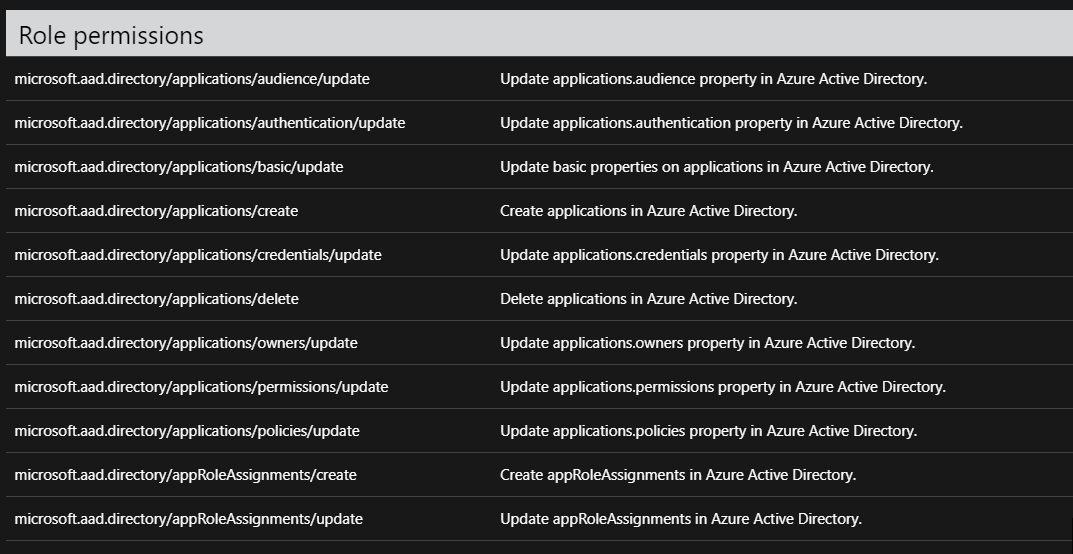
So I’ve been wanting to write about this for some time now. For the longest time, I’ve managed our Azure AD. The problem came in when it came to setting up new application registrations. You needed entirely too powerful of permissions to set up these registrations. It was a nightmare, because I found myself on calls setting up these registrations for no reason. I asked a few folks at Ignite about this, and Microsoft assured myself and others that they were working on it. The following Ignite ( This year) they released an update to Azure AD roles.
I am not even entirely sure you can understand how painful this was as a Directory architect. Having the ability to selectively allow people to create applications registrations allows me to automate so many workflows.
Good job Microsoft
Recently my company moved from the paid per service that Microsoft offers into the Service Hub model. I have to tell you, I am very impressed so far.
One of the biggest challenges we had before, was it was never really clear between large organizations who had the ability to open cases. The services hub fixes all of that by making it far more transparent. You also get the ability to review contracts, check on all other cases that are open.
I’ve also learned that the learning videos and assessment stuff that Microsoft use to charge for now is included free. If your organization is thinking about going with the services hub, I highly recommend it.

 Peters ramblings