Microsoft’s Linux Love Letter: A Necessary Dose of Historical Context
A headline caught my eye recently, one in a long series of similar pieces from Microsoft: a celebratory look back at their 2009 contribution of 20,000 lines of code to the Linux kernel. The narrative is one of a new leaf, a turning point, a company evolving from a closed-source fortress into a collaborative open-source neighbor.
And on its face, that’s a good thing. I am genuinely glad that Microsoft contributes to Linux. Their work on Hyper-V drivers and other subsystems is technically sound and materially benefits users running Linux on Azure. It’s a practical, smart business move for a company whose revenue now heavily depends on cloud services that are, in large part, powered by Linux.
But as I read these self-congratulatory retrospectives, I can’t help but feel a deep sense of whiplash. To present this chapter without the full context of the book that preceded it is not just revisionist; it’s borderline insulting to those of us who remember the decades of hostility.
Let’s not forget what “building and collaborating” looked like for Microsoft before it became convenient.
This is the company whose CEO, Steve Ballmer, famously called Linux “a cancer” in 2001. This wasn’t an off-the-cuff remark; it was the public-facing declaration of a deeply entrenched corporate ideology. For years, Microsoft’s primary strategy wasn’t to out-build Linux, but to use its immense market power to strangle it.
They engaged in a brutal campaign of FUD (Fear, Uncertainty, and Doubt):
They threatened patents, suggesting that Linux and other open-source software infringed on hundreds of Microsoft patents, aiming to scare corporations away from adoption.
They entered into costly licensing agreements with other tech companies, essentially making them pay “protection money” against hypothetical lawsuits.
They argued that open-source software was an intellectual property-destroying “communist” model that was antithetical to American business.
This was not healthy competition. This was a multi-pronged legal and rhetorical assault designed to kill the project they now proudly contribute to. They didn’t just disagree with open source; they actively tried to destroy it.
So, when Microsoft writes a post that frames their 2009 code drop as a moment that “signaled a change in how we build and collaborate,” I have to ask: what changed?
Did the company have a moral awakening about the virtues of software freedom? Did they suddenly realize the error of their ways?
The evidence suggests otherwise. What changed was the market. The rise of the cloud, which Microsoft desperately needed to dominate with Azure, runs on Linux. Their old strategy of hostility became a direct threat to their own bottom line. They didn’t embrace Linux; they surrendered to its inevitability. The contribution wasn’t a peace offering; it was a strategic necessity. You can’t be the host for the world’s computing if you refuse to support the world’s favorite operating system.
This isn’t to say we shouldn’t accept the contribution. We should. The open-source community has always been pragmatically welcoming. But we should accept it with clear eyes.
Praising Microsoft for its current contributions is fine. Forgetting its history of attempted destruction is dangerous. It whitewashes a chapter of anti-competitive behavior that should serve as a permanent cautionary tale. It allows a corporation to rebrand itself as a “cool, open-source friend” without ever fully accounting for its past actions.
So, by all means, let’s acknowledge the 20,000 lines of code. But let’s also remember the millions of words and dollars spent trying to make sure those lines—and the entire ecosystem around them—would never see the light of day. The true story isn’t one of a change of heart, but a change of market forces. And that’s a history we must never let them forget.
I’ve been going to DEF CON long enough to remember when it felt like a secret. Not exclusive in the snobby sense, but niche in the way only a gathering of curious misfits, tinkerers, and unapologetic troublemakers could be. It was a place where you could walk into a random hallway and end up in a three-hour conversation about buffer overflows, lockpicking, or some bizarre telephony exploit from the ‘80s.
This year, though, something felt… different. Maybe it’s me. Maybe I’ve grown out of it. Maybe it’s just the sheer mass of people — the lines, the photo ops, the Instagrammable “hacker aesthetic” that makes it feel more like a pop culture event than a gathering of weirdos solving problems no one else cares about.
And then it happened: I saw a picture of Jeff Moss, the founder of DEF CON, doing jello shots with the NSA. Not a metaphor. Not a rumor. Literally jello shots. With the NSA.
The moment was like watching the punk band you loved in high school play a corporate-sponsored halftime show. I stood there, caught between thinking this is hilarious and what the hell happened here?
It’s not that I expect DEF CON to stay frozen in time. Things evolve. Communities grow. People change. But this was a visual that perfectly summed up my uneasy feeling — the line between “us” and “them” has blurred, and maybe it’s gone altogether.
I don’t hate it. I’m not even saying it’s wrong. But I can’t shake the feeling that the DEF CON I fell in love with — messy, raw, niche, and slightly dangerous — isn’t here anymore.
Maybe that’s progress. Or maybe it’s just a sign that the underground doesn’t stay underground forever.
You do not need to take classes on making good experiences anymore.
It’s not about making great software anymore. It’s not about building games people love. It’s about how many damn paywalls you can cram into every corner of your tech stack. Every menu, every feature, every damn pixel has a price tag now. It’s monetization hell and we’re all being dragged through it.
You don’t buy a video game anymore—you subscribe to a “live service” that milks you monthly for skins, DLC, “premium tiers,” or some other garbage they didn’t finish before launch. Enshittification isn’t a side effect—it’s the whole business model now.
The goal isn’t quality. It’s recurring revenue. It’s locking users into a maze of subscriptions, tokens, microtransactions, and artificial limitations that only disappear if you cough up more cash.
Look, the old ways of auth weren’t built for what’s coming. AI agents don’t live in static sessions or predictable flows—they’re ephemeral, reactive, scattered across clouds, and making decisions faster than your token TTL. So why are we still handing them bearer tokens like it’s 2012? Nothing should be permanent. Context matters. What the agent is doing right now should influence what it’s allowed to do right now. That means proof tied to the moment, not to some long-lived credential you forgot to revoke. It should be rooted in hardware—attested, unforgeable, impossible to rip out and reuse. And above all, it should be decentralized. No single gatekeeper. No single failure point. Trust should move with the agent, like a shadow—provable, portable, disposable. Authentication needs to evolve, or it’ll just be another thing the agents bypass.
As AI MCP agents evolve into autonomous, multi-tenant actors operating across data planes, trust boundaries, and compute contexts, traditional token-based frameworks like OAuth 2.0 fail to provide the necessary granularity, context-awareness, and runtime verification. CADA introduces a new model for zero-standing privilege, context-aware identity, and attestation-driven trust, leveraging confidential computing and decentralized identity primitives.
Core Pillars
Decentralized Identity Anchors (DID-A)
Each MCP agent is assigned a Decentralized Identifier (DID) backed by a verifiable credential (VC).
The identity is not centrally registered but anchored in a distributed ledger or verifiable key infrastructure (e.g., SIDetree, Sovrin, or ION).
DIDs resolve to metadata including key rotation history, policies, and agent type (exploratory, monitoring, remediation, etc.).
Context-Bound Proof-of-Presence Tokens (CB-PoP)
Instead of bearer tokens, agents use signed ephemeral tokens with embedded context:
Temporal window (e.g., within the last 30s)
Location constraints (verified via confidential enclave attestation)
Input/output scope (model state hashes, data fingerprinting)
These are validated by services with confidential computing backends using Intel SGX/AMD SEV or AWS Nitro Enclaves.
FIDO2 + TPM/TEE Hardware Anchoring
Each agent’s execution environment binds its private signing key to a hardware root of trust, such as TPM or TEE.
Authentication occurs via WebAuthn-style challenges, signed inside a secure enclave, with attestation reports validating runtime integrity.
Eliminates key export risk and enables remote trust of agent execution context.
Dynamic Trust Contracts (DTC)
Each authenticated interaction is governed by a smart contract defining:
Data access policies
Audit/tracing rules
Time-limited execution permissions
Revocation semantics based on real-time observability inputs
These contracts are cryptographically signed by the MCP owner and verified prior to execution.
Zero Standing Privilege with Just-In-Time Delegation
Agents do not persist access tokens.
Authorization is granted at runtime through delegated trust, using time-bound, task-specific credentials derived from identity and context proof.
Authentication Flow Example
Agent Bootstraps Identity
Generates ephemeral DID linked to owner’s permanent identity
Signs its public key using its hardware-anchored root
Agent Requests Access to Service
Prepares CB-PoP: signs request metadata, timestamps, hash of recent model inputs, and enclave measurement
Attaches DID and enclave attestation proof
Service Validates Request
Resolves DID and verifies VC chain
Confirms enclave integrity and CB-PoP freshness
Checks smart contract for permission rules
Access Granted
Service encrypts data with agent’s public key (ensuring only that enclave can decrypt)
Transaction is logged immutably with context metadata
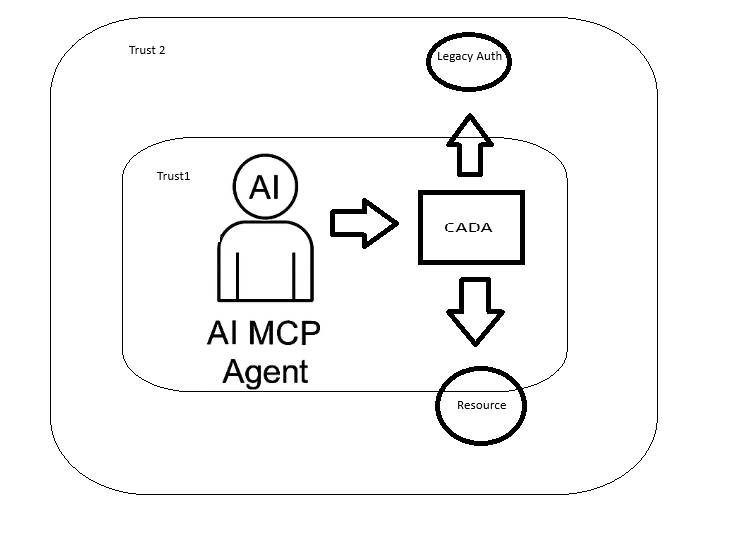
Why It’s Better than OAuth
Feature
OAuth 2.0
CADA
Agent Identity
Static Client ID
Dynamic, Decentralized DID
Trust Model
Predefined Scopes
Runtime Context + Attestation
Token Security
Bearer
Ephemeral, Context-bound, Non-exportable
Privilege Model
Long-lived Access
Zero-standing Privilege
Revocation
Manual / Opaque
Smart Contracts, Observable Context
I started to write some stuff last night in Rust, I'll get this up in Github in the next few days.
Generate a Decentralized Identity (DID)
use ssi::did::DIDMethod;
use ssi::did_resolve::DIDResolver;
use ssi::jwk::{JWK, Params as JWKParams};
use ssi::vc::URI;
fn generate_did() -> Result<(), Box<dyn std::error::Error>> {
let jwk = JWK {
params: JWKParams::OKP(ssi::jwk::OctetParams {
curve: "Ed25519".to_string(),
public_key: vec![],
private_key: Some(vec![]), // Generate ephemeral keypair
}),
..Default::default()
};
let did = ssi::did::did_key::DIDKey.generate(&jwk)?;
println!("Generated DID: {}", did);
Ok(())
}
Bind Key to Hardware (e.g. TPM or Nitro Enclave)
use tss_esapi::Context;
use tss_esapi::structures::{Auth, Public};
fn generate_tpm_bound_key() -> Result<(), Box<dyn std::error::Error>> {
let mut context = Context::new(Default::default())?;
let key_auth = Auth::try_from(vec![0u8; 32])?;
let public = Public::rsa_encrypt_decrypt_key(/* your key parameters here */);
let (key_handle, _) = context.create_primary(public, key_auth)?;
println!("Key generated and bound to TPM context.");
Ok(())
}
Create a Context-Bound Proof Token (CB-PoP)
use chrono::Utc;
use ring::signature::{Ed25519KeyPair, KeyPair};
use serde_json::json;
fn create_cb_pop(agent_id: &str, model_digest: &str, enclave_measurement: &str) -> String {
let now = Utc::now().timestamp();
let token = json!({
"agent_id": agent_id,
"timestamp": now,
"context": {
"model_state_hash": model_digest,
"enclave": enclave_measurement
}
});
// Sign it using an ephemeral keypair inside enclave or bound to TPM
let keypair = Ed25519KeyPair::from_pkcs8(&get_private_key_bytes()).unwrap();
let signature = keypair.sign(token.to_string().as_bytes());
json!({
"token": token,
"signature": base64::encode(signature.as_ref())
}).to_string()
}
Smart Contract
use ethers::prelude::*;
use std::sync::Arc;
#[tokio::main]
async fn validate_contract_permission(agent_id: String) -> Result<(), Box<dyn std::error::Error>> {
let provider = Provider::<Http>::try_from("https://mainnet.infura.io/v3/YOUR_PROJECT_ID")?;
let client = Arc::new(SignerMiddleware::new(provider, Wallet::from(...)));
let contract = Contract::new("0xYourContractAddress", contract_abi, client);
let is_allowed: bool = contract.method::<_, bool>("isAuthorized", agent_id)?.call().await?;
println!("Access allowed: {}", is_allowed);
Ok(())
}
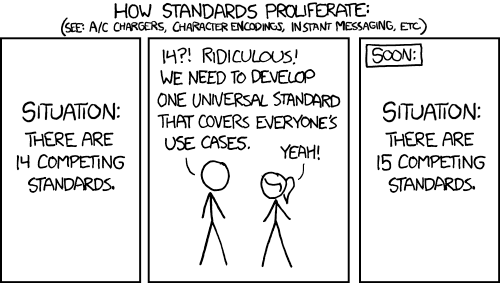
I wasn’t really sure I even wanted to write this up — mostly because there are some limitations in MCP that make things a little… awkward. But I figured someone else is going to hit the same wall eventually, so here we are.
If you’re trying to use OAuth 2.0 with MCP, there’s something you should know: it doesn’t support the full OAuth framework. Not even close.
MCP only works with the default well-known endpoints:
/.well-known/openid-configuration
/.well-known/oauth-authorization-server
Before we get going, let me write this in the biggest and most awkward text I can find.
Run the Device Flow outside of MCP, then inject the token into the session manually.
And those have to be hosted at the default paths, on the same domain as the issuer. If you’re using split domains, custom paths, or a setup where your metadata lives somewhere else (which is super common in enterprise environments)… tough luck. There’s no way to override the discovery URL.
It also doesn’t support other flows like device_code, jwt_bearer, or anything that might require pluggable negotiation. You’re basically stuck with the default authorization code flow, and even that assumes everything is laid out exactly the way it expects.
So yeah — if you’re planning to hook MCP into a real-world OAuth deployment, just be aware of what you’re signing up for. I wish this part of the protocol were a little more flexible, but for now, it’s pretty locked down.
Model Context Protocol (MCP) is an emerging standard for AI model interaction that provides a unified interface for working with various AI models. When implementing OAuth with an MCP test server, we’re dealing with a specialized scenario where authentication and authorization must accommodate both human users and AI agents.
This technical guide covers the implementation of OAuth 2.0 in an MCP environment, focusing on the unique requirements of AI model authentication, token exchange patterns, and security considerations specific to AI workflows.
Prerequisites
Before implementing OAuth with your MCP test server:
MCP Server Setup: A running MCP test server (v0.4.0 or later)
Developer Credentials: Client ID and secret from the MCP developer portal
OpenSSL: For generating key pairs and testing JWT signatures
Understanding of MCP’s Auth Requirements: Familiarity with MCP’s auth extensions for AI contexts
Section 1: MCP-Specific OAuth Configuration
1.1 Registering Your Application
MCP extends standard OAuth with AI-specific parameters:
Implementing OAuth with an MCP test server requires attention to MCP’s AI-specific extensions while following standard OAuth 2.0 patterns. Key takeaways:
Always include MCP context parameters in auth flows
What’s new? Oh, just your usual dose of 1,000+ micro-patches, mysterious scheduler “optimizations,” and a whole bunch of drivers you didn’t know your toaster needed.
The changelog reads like a novel written by a caffeinated robot: fixes for AMD, tweaks for Intel, a gentle pat on the back for ARM, and a completely normal update to BPF that definitely won’t break your debug setup (again).
So here’s a weird rabbit hole I went down recently: trying to figure out why Linux memory allocation slows to a crawl under pressure — especially on big multi-socket systems with a ton of cores. The culprit? Good ol’ SLUB. And no, I don’t mean a rude insult — I mean the SLUB allocator, one of the core memory allocators in the Linux kernel.
If you’ve ever profiled a high-core-count server under load and seen strange latency spikes in malloc-heavy workloads, there’s a good chance SLUB contention is part of it.
The Setup
Let’s say you’ve got a 96-core AMD EPYC box. It’s running a real-time app that’s creating and destroying small kernel objects like crazy — maybe TCP connections, inodes, structs for netlink, whatever.
Now, SLUB is supposed to be fast. It uses per-CPU caches so that you don’t have to lock stuff most of the time. Allocating memory should be a lockless, per-CPU bump pointer. Great, right?
Until it’s not.
The Problem: The Slow Path of Doom
When the per-CPU cache runs dry (e.g., under memory pressure or fragmentation), you fall into the slow path, and that’s where things get bad:
SLUB hits a global or per-node lock (slub_lock) to refill the cache.
If your NUMA node is short on memory, it might fallback to a remote node — so now you’ve got cross-node memory traffic.
Meanwhile, other cores are trying to do the same thing. Boom: contention.
Add slab merging and debug options like slub_debug into the mix, and now you’re in full kernel chaos mode.
If you’re really unlucky, your allocator calls will stall behind a memory compaction or even trigger the OOM killer if it can’t reclaim fast enough.
Why This Is So Hard
This isn’t just “optimize your code” kind of stuff — this is deep down in mm/slub.c, where you’re juggling:
Atomic operations in interrupt contexts
Per-CPU vs. global data structures
Memory locality vs. system-wide reclaim
The fact that one wrong lock sequence and you deadlock the kernel
There are tuning knobs (/proc/slabinfo, slub_debug, etc.), but they’re like trying to steer a cruise ship with a canoe paddle. You might see symptoms, but fixing the cause takes patching and testing on bare metal.
Things I’m Exploring
Just for fun (and pain), I’ve been poking around the idea of:
Introducing NUMA-aware slab refill batching, so we reduce cross-node fallout.
Using BPF to trace slab allocation bottlenecks live (if you haven’t tried this yet, it’s surprisingly helpful).
Adding a kind of per-node, per-type draining system where compaction and slab freeing can happen more asynchronously.
Not gonna lie — some of this stuff is hard. It’s race-condition-central, and the kind of thing where adding one optimization breaks five other things in edge cases you didn’t know existed.
SLUB is amazing when it works. But when it doesn’t — especially under weird multi-core, NUMA, low-memory edge cases — it can absolutely wreck your performance.
And like most things in the kernel, the answer isn’t always “fix it” — sometimes it’s “understand what it’s doing and work around it.” Until someone smarter than me upstreams a real solution.
Let me be crystal clear: I hate kernel-level anti-cheat.
I’m not talking about a mild dislike, or a passing irritation. I mean deep, primal, disgust. The kind you feel when you realize the thing you paid for—your game, your entertainment, your free time—comes with a side of invasive rootkit-level surveillance masquerading as “protection.”
You call it BattlEye, Vanguard, Xigncode, whatever the hell you want. I call it corporate spyware with a EULA.
It’s MY Computer, Not Yours
Let’s get this straight: no anti-cheat—none—has any damn business installing itself at the kernel level, the most privileged layer of my operating system. You know who else runs code in the kernel?
So, no, I don’t want your “proactive protection system” watching every process I launch, analyzing memory usage, intercepting system calls, and God-knows-what-else while I try to enjoy a couple hours of gaming. That’s not anti-cheat. That’s anti-user.
“But It’s Necessary to Stop Cheaters!”
Don’t feed me that line. You mean to tell me the only way to stop some 14-year-old aimbotting in Call of Duty: Disco Warfare 7 is to give you full access to the innermost sanctum of my machine? Are you serious?
There’s a difference between anti-cheat and carte blanche to run black-box software with system-level privileges. If your defense against wallhacks requires administrator rights on MY computer 24/7, your design is broken.
Cheaters are clever, sure. But so are malware authors. You know what they do? Exploit over-privileged software running in the kernel. You’ve just handed them one more juicy target.
I Didn’t Sign Up to Beta Test Your Surveillance System
Let’s talk about transparency. There isn’t any.
What does your anti-cheat actually do? What telemetry does it collect? What heuristics are used to flag me? Does it store that data? Share it? Sell it? Run in the background when I’m not even playing?
You won’t tell me. You’ve locked it up tighter than Fort Knox and buried it in an NDA-laced support email chain.
And don’t even get me started on false positives. I’ve seen legit players banned for running Discord overlays or having a debugger open from their job. Their appeals? Ignored. Labeled cheaters by automated judgment, with no accountability.
The Irony? You Still Don’t Stop Cheaters
And here’s the kicker. You’re still losing.
Despite all this Big Brother garbage, cheaters still infest games. ESPs, ragebots, HWID spoofers—they’re thriving. Know why?
Because you’re fighting a cat-and-mouse game with people who are smarter, faster, and more motivated than your overfunded security team. You’re just screwing over everyone else in the process.
Enough
I don’t want a rootkit with my copy of Rainbow Six. I don’t want a watchdog in the kernel just to enjoy Escape from Tarkov. I don’t want to sacrifice privacy, performance, or basic control over my system for the privilege of not being called a cheater.
I’ve been working on this for awhile. I want to start writing more about Pytorch. One topic that has been taking a lot of my reading time these days is catastrophic forgetting. Lets dive into it. Catastrophic forgetting is a well-documented failure mode in artificial neural networks where previously learned knowledge is rapidly overwritten when a model is trained on new tasks. This phenomenon presents a major obstacle for systems intended to perform continual or lifelong learning. While human learning appears to consolidate past experiences in ways that allow for incremental acquisition of new knowledge (a huge fucking maybe here btw, in fact, a lot of this is a deep maybe), deep learning systems—especially those trained using stochastic gradient descent—lack native mechanisms for preserving older knowledge. In this article, we explore how PyTorch can be used to simulate and mitigate this effect using a controlled experiment involving disjoint classification tasks and a technique called Elastic Weight Consolidation (EWC).
Why do you care? Recently at work, my boss had to explain in detail how my company makes sure that there is no data left if processing nodes are reused. That really got me thinking about this…
We construct a continual learning environment using MNIST by creating two disjoint tasks: one involving classification of digits 0 through 4 and another involving digits 5 through 9. The dataset is filtered using torchvision utilities to extract samples corresponding to each task. A shared multilayer perceptron model is defined in PyTorch using two fully connected hidden layers followed by a single classification head, allowing us to isolate the effects of sequential training on a common representation space. The model is first trained exclusively on Task A using standard cross-entropy loss and Adam optimization. Performance is evaluated on Task A using a held-out test set. Following this, the model is trained on Task B without revisiting Task A, and evaluation is repeated on both tasks.
import torch
import torch.nn as nn
import torch.nn.functional as F
class MLP(nn.Module):
def init(self):
super().init()
self.fc1 = nn.Linear(784, 256)
self.fc2 = nn.Linear(256, 256)def forward(self, x):
x = x.view(x.size(0), -1)
x = F.relu(self.fc1(x))
x = F.relu(self.fc2(x))
return self.out(x)
As expected, the model exhibits catastrophic forgetting: accuracy on Task A degrades significantly after Task B training, despite the underlying model architecture remaining unchanged. This result validates the conventional understanding that deep networks, when trained naively on non-overlapping tasks, tend to fully overwrite internal representations. To counteract this, we implement Elastic Weight Consolidation, which penalizes updates to parameters deemed important for previously learned tasks.
def compute_fisher(model, dataloader):
model.eval()
fisher = {n: torch.zeros_like(p) for n, p in model.named_parameters() if p.requires_grad}
for x, y in dataloader:
x, y = x.to(device), y.to(device)
model.zero_grad()
out = model(x)
loss = F.cross_entropy(out, y)
loss.backward()
for n, p in model.named_parameters():
if p.grad is not None:
fisher[n] += p.grad.data.pow(2)
for n in fisher:
fisher[n] /= len(dataloader)
return fis
To apply EWC, we compute the Fisher Information Matrix for the model parameters after Task A training. This is done by accumulating the squared gradients of the loss with respect to each parameter, averaged over samples from Task A. The Fisher matrix serves as a proxy for parameter importance—those parameters with large entries are assumed to play a critical role in preserving Task A performance. When training on Task B, an additional term is added to the loss function that penalizes the squared deviation of each parameter from its Task A value, weighted by the corresponding Fisher value. This constrains the optimizer to adjust the model in a way that minimally disrupts the structure needed for the first task.
Empirical evaluation demonstrates that with EWC, the model retains significantly more performance on Task A while still acquiring Task B effectively. Without EWC, Task A accuracy drops from 94 percent to under 50 percent. With EWC, Task A accuracy remains above 88 percent, while Task B accuracy only slightly decreases compared to the unconstrained case. The exact tradeoff can be tuned using the lambda regularization hyperparameter in the EWC loss.
This experiment highlights both the limitations and the flexibility of gradient-based learning in sequential settings. While deep neural networks do not inherently preserve older knowledge, PyTorch provides the low-level control necessary to implement constraint-aware training procedures like EWC. These mechanisms approximate the role of biological consolidation processes observed in the human brain and provide a path forward for building agents that learn continuously over time.
Future directions could include applying generative replay, using dynamic architectures that grow with tasks, or experimenting with online Fisher matrix approximations to scale to longer task sequences. While Elastic Weight Consolidation is only one tool in the broader field of continual learning, it serves as a useful reference implementation for those investigating ways to mitigate the brittleness of static deep learning pipelines.
Why the hell does this matter? beyond classification accuracy and standard benchmarks, the structure of learning itself remains an open frontier—one where tools like PyTorch allow morons and nerds like me to probe and control the dynamics of plasticity and stability in artificial systems.
Look at this. Just look at it. This is what happens when you let people “vibe” their way through coding instead of learning how computers actually work.
What the Hell is Vibe Coding?
Vibe coding is the latest plague infesting our industry—a mindset where developers treat programming like some kind of abstract art form, where “feeling” the code is more important than understanding it. These people don’t optimize, they don’t measure, and they sure as hell don’t care about the consequences of their half-baked, duct-taped-together monstrosities.
Instead of learning how databases work, they just throw more RAM at it. Instead of profiling their garbage code, they scale horizontally until their cloud bill looks like the GDP of a small nation. And when things inevitably explode? They shrug and say, “It worked on my machine!” before hopping onto Twitter to post about how “coding is all about vibes.”
Vibe Coders Are Why Your Startup Burned Through $1M in Cloud Costs
The screenshot above isn’t fake. It’s not exaggerated. It’s the direct result of some “senior engineer” who thought they could just vibe their way through architecture decisions.
“Why use a cache when we can just query the database 10,000 times per second?”
“Who needs indexes? Just throw more replicas at it!”
“Let’s deploy this unoptimized Docker container to Kubernetes because it’s ✨scalable✨!”
And then—surprise!—the bill arrives, and suddenly, the CTO is having a panic attack while the vibe coder is tweeting about how “the cloud is just too expensive, man” instead of admitting they have no idea what they’re doing.
The Cult of Ignorance
Somewhere along the way, programming became less about engineering and more about aesthetic. People treat coding like a personality trait rather than a skill. They’d rather:
Spend hours tweaking their VS Code theme than learning how their HTTP server actually handles requests.
Write 17 layers of unnecessary abstraction because “clean code” told them to.
Deploy serverless functions for every single if-statement because “it’s scalable, bro.”
And the worst part? They’re proud of this. They’ll post their over-engineered, inefficient mess on LinkedIn like it’s something to admire. They’ll call themselves “10x engineers” while their entire app collapses under 50 users because they never bothered to learn what a damn database transaction is.
Real Engineering > Vibes
Here’s a radical idea: Learn how things work before you build them.
The next time you’re about to cargo-cult some garbage architecture you saw on a Medium post, ask yourself: Do I actually understand this? If the answer is no, step away from the keyboard and pick up a damn book.
Because vibes won’t save you when your production database is on fire.