
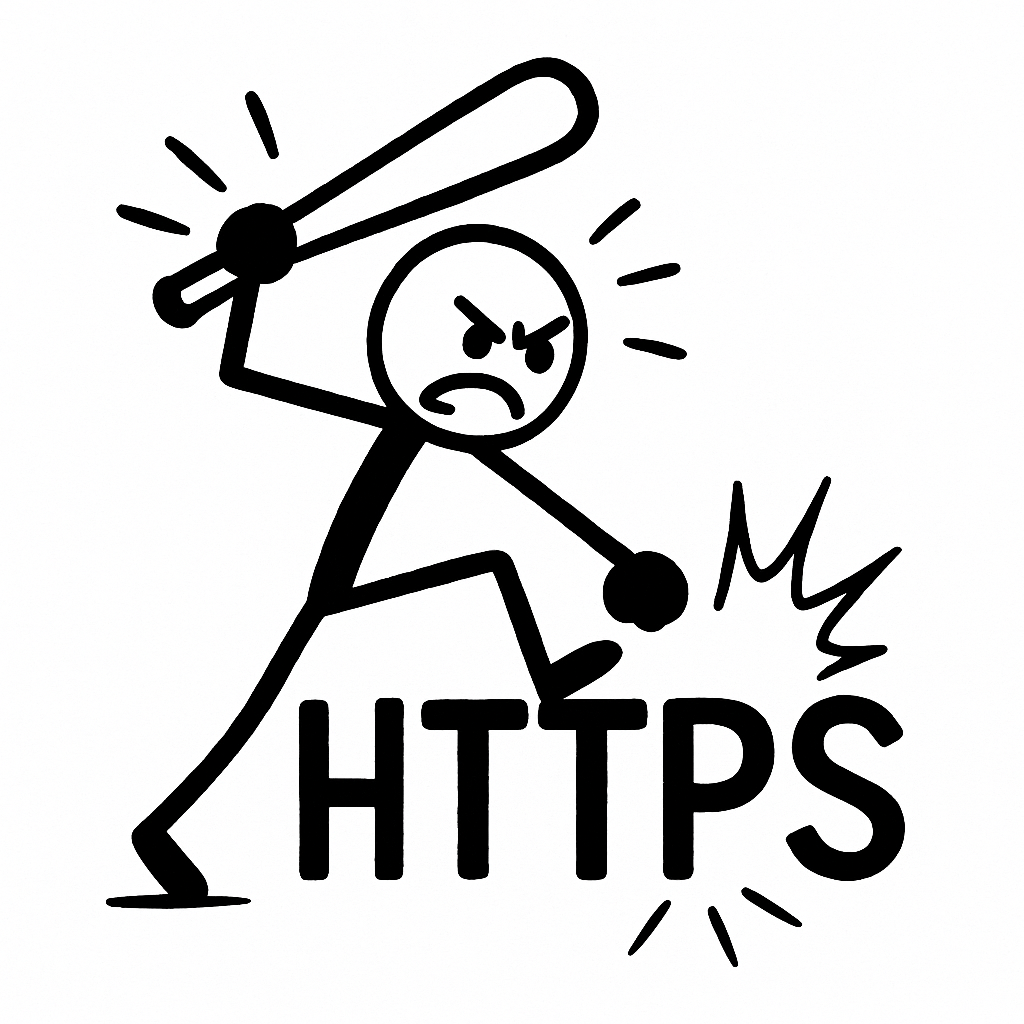
Who Designed This? A Deep Dive Into Ping Federate’s Maze of Misery

You ever stare at an “Access Token Invalid” error for 3 hours, only to realize the JWT claim wasn’t missing — it just wasn’t included in the default Ping policy unless you sacrificed a chicken under a full moon?

Because I have.

I’ve just come out the other side of integrating PingFederate + PingAuthorize to issue EC-signed JWTs for Snowflake OAuth client credentials flow.

It took me:

  • 30+ screenshots
  • 6 document versions
  • 3 complete rebuilds of policy trees
  • and a signed token that still somehow didn’t include scp despite explicitly defining it 5 different ways

What Should’ve Taken 2 Hours Took 2 Days

Let me be brutally clear: setting up Client Credentials Flow should not feel like doing a doctoral thesis in Authorization XML. But with Ping? It’s like wrestling a snake made of drop-down menus and hidden dependencies.

Here’s what I went through:

  • Infinite policy recursion: I evaluated the same policy from 4 layers deep and still got an empty access token.
  • No defaults, no fallbacks: If you forget to bind your attribute to a resolver and then call it from a tree, inside a statement, inside a scope condition, congrats — the token will just ignore you.
  • ES256 Signing? Cool. But what if the JWKS URI suddenly returns nothing unless the key is active AND marked default AND exposed? Hope you like toggling checkboxes in four different tabs with no warning.

PingFederate UX Is an Escape Room

Every screen is a trap:

  • The UI is inconsistent.
  • Labels don’t match docs.
  • You have to click into “Details” > “Modify” > “Advanced” just to find basic claim injection logic.

God forbid you want to include both sub and upn. Because unless you build a nested policy that resolves scopes, checks the client ID, and custom-serializes each claim into a payload block, you’re going to get a token with exactly one thing: a timestamp and your broken dreams.

The Best Part?

I finally got a working token. I decoded it, tears in my eyes. The payload was correct. It passed into Snowflake. But I didn’t feel proud. I felt robbed.

Robbed of a week of work.
Robbed of all the time I spent trying to extract logic from screenshots like they were cave paintings.
Robbed by a system that could be great, but fights you every single step of the way.

Here’s What I Learned (So You Don’t Suffer Like I Did)

  1. Never trust the UI. Export XML and grep it like you’re in 2003.
  2. Manually test token scopes using curl and JWT decode — trust nothing inside Ping.
  3. Document everything. Because next week, your working token will stop working, and no one knows why.
  4. Sign your own tokens with your own key and validate the claims manually. Because relying on Ping to do what it says it will do is like hiring a mime to narrate your audiobook.

I Have No Idea What ‘Mentor’ Means Anymore

I’m honored to be mentoring 14 people across three global communities and also advising four stealth startups. Empowering the next generation of builders!

What the fuck does that even mean?

Did you hop on a Zoom call with someone once and tell them to “just believe in yourself”? Did you send a link to an outdated Medium post and call it career coaching? Or—my personal favorite—did you tell a junior engineer to “Google it” and then slap Mentorship Experience on your resume?

Everyone’s a mentor now. A coach. A keynote speaker. A guiding light. A North Star. A personal branding consultant. A Web3 philosopher.

Meanwhile, when actual work needs to get done, half these “mentors” are ghosting Slack, failing PR reviews, or posting motivational quotes about “grit” while someone else is cleaning up their Jenkins pipeline.

Let me break something to you gently:
You don’t have a brand. You have a job.

Somewhere along the way, the tech industry convinced itself that every human being is a startup. You’re not a person anymore—you’re a “personal brand,” a “founder of your own narrative,” a “content engine.” The obsession with branding yourself is turning people into walking LinkedIn carousels with zero self-awareness and even less actual value.

Here’s a fun fact: no one has ever asked me about my “brand.”
Not once.
No job interview. No client. No partner. No vendor.
Not one person has said, “Hey Peter, I was really moved by the synergy of your banner image and your title font. Tell me more.”

They ask what I’ve done. What I can fix. How I deal with hard problems. Not how I “position myself” as a “servant-leader technologist who thrives in ambiguity.”

How the fuck did we get here?

I miss when people just did things. Quietly. Without a 17-part LinkedIn post chronicling their “growth journey.” Without turning every pull request into a TED Talk. Without turning every coffee chat into a personal branding opportunity.

Kernel Chronicles: Syscalls, Shenanigans, and Lessons Learned

I was sitting in the office today talking about syscalls, that made me want to type a lot about it, so….here goes

Do you want to explore the intricacies of Linux kernel syscalls through real-world debugging tales, highlighting unexpected behaviors and valuable lessons for developers navigating kernel space. Me neither, but lets do it anyway

Ever felt like your syscall was swallowed by the kernel abyss? Venturing into kernel development often leads to such enigmatic experiences. This post delves into the world of syscalls, sharing humorous anecdotes and hard-earned lessons from the trenches of kernel debugging.

Understanding Syscalls

System calls, or syscalls, serve as the bridge between user space and kernel space, allowing applications to request services from the operating system. Think of it as a child asking a parent for scissors—accessing something potentially dangerous requires a formal request.

In Linux, syscalls are typically invoked via software interrupts or specific CPU instructions, transitioning control from user space to kernel space. This mechanism ensures controlled access to critical system resources.

Funny Syscall Quirks

The Case of the Disappearing File Descriptor

While implementing a custom syscall, I encountered a perplexing issue: file descriptors would mysteriously vanish. After hours of debugging, I realized I had forgotten to increment the reference count, leading to premature deallocation. A classic rookie mistake!

The Infinite Loop of Doom

In another instance, a misplaced condition check resulted in a syscall entering an infinite loop. The system became unresponsive, and I had to perform a hard reboot. Lesson learned: always validate your exit conditions.

Misinterpreted Return Values

I once misread a syscall’s return value, treating a negative error code as a valid result. This oversight led to cascading failures in the application. Proper error handling is crucial to prevent such mishaps.(Medium)

Lessons Learned and the PAINFUL STUFF

  • Incorrectly Replicating OS Semantics: When intercepting syscalls, ensure that the behavior remains consistent with the original OS semantics to avoid unexpected side effects.
  • Overlooking Indirect Paths: Be mindful of indirect resource accesses, such as symbolic links or file descriptors passed between processes, which can bypass your syscall interposition logic.(cs155.stanford.edu)
  • Race Conditions: Implement proper synchronization mechanisms to prevent race conditions, especially when dealing with shared resources.

Best Practices

  • Thorough Testing: Test syscalls under various scenarios to uncover edge cases and ensure robustness.
  • Comprehensive Logging: Implement detailed logging within syscalls to aid in debugging and performance analysis.
  • Code Reviews: Regularly conduct code reviews with peers to catch potential issues early in the development cycle.

Advanced Debugging Techniques

Utilizing strace

strace is an invaluable tool for monitoring syscalls made by a process. It provides insights into the sequence of syscalls, their arguments, and return values, aiding in pinpointing issues.

Leveraging perf

perf allows for performance profiling and tracing of syscalls. It helps identify bottlenecks and optimize syscall implementations for better efficiency.

Exploring bpftrace

bpftrace enables dynamic tracing of kernel functions, including syscalls. It offers a powerful scripting language to write custom probes for in-depth analysis.

Navigating the realm of kernel syscalls is both challenging and rewarding. While the journey is fraught with pitfalls and perplexities, each obstacle overcome adds to your expertise. Embrace the quirks, learn from the lessons, and continue exploring the depths of kernel developments

Your App Secrets Are Naked (and eBPF Knows It)

Let’s talk about something that’s both cool and slightly terrifying: using eBPF to watch socket syscalls before your fancy encryption kicks in. Yeah. You know that HTTPS request you were so proud of? The one that uses TLS and keeps your users “safe”? eBPF saw the plaintext before TLS even had a chance to clear its throat.

Wait, what?

At the syscall level — right at the edge of kernelspace — there’s a tiny window where everything your app says is still in cleartext. It hasn’t hit OpenSSL yet. It hasn’t been base64’d, hex’d, gzip’d, or otherwise obfuscated. It’s just sitting there, raw and readable.

That’s where this eBPF program jumps in with its metaphorical notebook and says, “Oooh, what’s this? Looks like a GET request to /secrets with a bearer token, neat.”

So what’s actually happening?

This program hooks into the connect, accept, read, write, etc. syscalls. When your app makes a socket connection and starts sending data, it snags the buffers. Literally — it reads the message you’re about to send, before any encryption, because you haven’t even handed it to the TLS library yet.

Want to fingerprint HTTP headers? Easy. Want to detect TLS handshakes? Sure — it even looks for ClientHello. Want to build a creepy little audit trail of who sent what where, with process info and directionality? Done.

Why does this matter?

Because most developers — and honestly, a lot of ops/security folks — think “I’m using HTTPS” is a full-stop safety guarantee.

But with kernel-level observability like this, HTTPS is a magician’s act that starts after the rabbit’s already out of the hat. The kernel saw the rabbit. The kernel can tell you the rabbit’s name, the address it was going to, and the hand that threw it.

So if you’re running sensitive apps (think login forms, auth tokens, secrets in HTTP headers — don’t lie, I’ve seen it), and you think encryption is a bulletproof cloak, just remember: anything you send before TLS gets its act together is up for grabs.

Is it useful? Absolutely.

Is it powerful? Wildly.
Should we maybe… pump the brakes on how much introspection we’re doing from inside the kernel? Yeah, probably.

Because the moment we say “sure, just parse app-layer data in-kernel,” we’re blurring the line between trusted computing base and trusted surveillance platform.

TL;DR

Encryption is great. But it starts after the syscall.
eBPF runs at the syscall.
So… yeah. Your secrets might be showing.

Building a Universal Auth Middleware for SaaS: Solving the Fragmented Authentication Problem

The Problem: SaaS Authentication Fatigue

As someone who uses dozens of SaaS products daily, I’m frustrated by the inconsistent authentication options across platforms. Some support Google OAuth but not GitHub. Others offer SAML but only for enterprise plans. Many still rely solely on email/password. This fragmentation creates:

  • Security headaches – Maintaining different credentials everywhere
  • User experience nightmares – Constant password resets and auth flows
  • Admin overhead – Managing SSO across multiple providers

The Vision: A Universal Auth Middleware

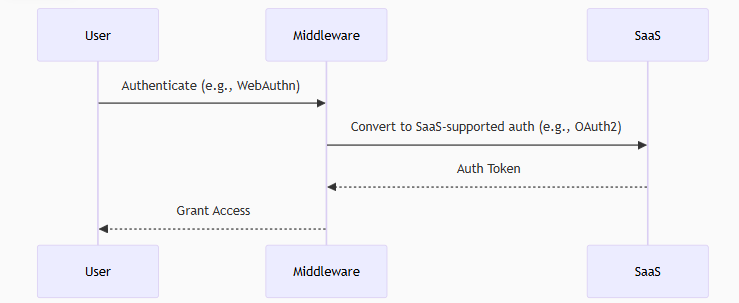
I want to build a middleware server that sits between users and SaaS applications, handling authentication seamlessly. Here’s how it would work:

  1. You authenticate with the middleware using your preferred method (WebAuthn, GitHub OAuth, SAML, etc.)
  2. The middleware authenticates to the SaaS on your behalf using whatever method the SaaS requires
  3. You get access without worrying about the SaaS’s auth limitations

Key Features

  • Multi-protocol support: Accept modern auth (OIDC, WebAuthn) and convert to whatever backend needs
  • Credential mapping: Your GitHub identity becomes the right format for each SaaS
  • Centralized control: One place to manage all your SaaS access
  • Protocol translation: Turn your FIDO2 hardware key into OAuth tokens for services that don’t support WebAuthn

Why This Matters

  1. User Experience: Never see “sign in with Google” again when you prefer GitHub
  2. Security: Enforce consistent MFA policies across all services
  3. Privacy: Control what personal info gets shared with each SaaS
  4. Future-proofing: Add new auth methods once to the middleware, not across all services

Technical Approach

The initial architecture would include:

  • Auth protocol adapters (OAuth2, SAML, WebAuthn, etc.)
  • Credential mapping engine
  • Token translation layer
  • Policy engine for access control

Next Steps

I’m planning to:

  1. Build a prototype supporting 2-3 auth methods and 1-2 SaaS backends
  2. Open source the core components
  3. Create plugins for common SaaS platforms

Observing the Wire: A Deep Dive into socket.bpf.c and eBPF-Based Socket Tracing

eBPF has been a powerful tools in the Linux kernel, offering safe and programmable hooks into low-level system behavior. I spent tonight reading about Qpoint. I dove deep into the socket.bpf.c file on their Git to understand how the QPoint is using eBPF to trace socket-level activity across the lifecycle of a connection. It monitors socket creation, data transmission, and teardown, while offering protocol-aware introspection—all from inside the kernel.

This is not just packet inspection. This is process-aware, syscall-correlated telemetry that bridges the user/kernel boundary with precision and intent.

What This Code Does

At its core, this eBPF program attaches to key syscall tracepoints (connect, accept, sendto, recvfrom, read, write, close, and others) and captures metadata and data buffers associated with socket usage. The major components include:

Socket Type Inference: At the sys_socket entry point, the code captures the domain, type, and protocol and stores it for use after the syscall returns.

Address and Connection Tracking: For syscalls like connect() and accept(), the destination or client address is captured and stored in per-FD maps. These addresses are then used to create per-connection identity tuples based on PID, FD, and time.

Data Path Inspection: As data flows through read, write, readv, writev, and their UDP counterparts, this code captures initial buffers—typically to fingerprint protocols like HTTP, TLS, or DNS—and submit structured events to a ring buffer.

TLS Detection: There’s a built-in handshake parser that looks for the ClientHello message to identify SSL traffic. TLS sessions are flagged and handled differently from plaintext traffic.

Process-Aware Filtering: Processes can be ignored dynamically via strategy maps (QP_IGNORE, QP_FORWARD, etc.), allowing selective inclusion or exclusion of connections based on runtime configuration.

Directional Filtering: The code differentiates between ingress and egress, loopback, internal vs. external traffic, and even proxies or management endpoints—giving the observer fine-grained control over what’s reported.

Design Strengths

  • Kernel-resident efficiency: There’s no context switching overhead once the program is loaded. Everything is collected in-place, using verifier-safe memory access patterns and bounded loops.
  • Structured telemetry: Events are explicitly typed (S_OPEN, S_DATA, S_CLOSE, S_PROTO, etc.) and correlated with per-connection state, offering clean semantics when consumed in user space.
  • Protocol awareness: Unlike netfilter or raw packet sniffers, this code attempts to interpret the meaning of a connection—protocol, direction, and usage pattern—rather than just its headers.

While the implementation is technically sound, it raises deeper questions about Linux’s trust model and kernel-user space boundaries.

This code captures application-level data buffers at syscall entry and exit points, before encryption or masking occurs in user space. It can fingerprint plaintext HTTP requests, detect SSL handshakes, and correlate traffic with process metadata. While extremely powerful for observability and security tooling, this also opens the door to surveillance.

The kernel, historically, has not been a place for application-layer parsing. Doing so, even with the verifier’s constraints, represents a shift from a minimal trusted computing base to something more introspective—and potentially overreaching.

  • What happens if this code misinterprets a protocol and causes false alerts?
  • Should all eBPF observers be allowed to inspect TLS handshakes by default?
  • Is it acceptable for an eBPF program to associate application data with PIDs and expose it externally?

These are not technical limitations—they’re design tradeoffs that need to be weighed carefully.

socket.bpf.c is a technical achievement. It showcases the full breadth of what modern eBPF tooling can do: real-time, low-overhead, semantically rich observability. But it also pushes on boundaries that Linux has historically tried to avoid—specifically, embedding high-level visibility logic in kernelspace.

The ability to introspect application behavior with this fidelity is powerful. But as with all power at the kernel level, it demands discipline, context-awareness, and a strong ethical hand.

Rotating Client Secrets

Rotating Snowflake OAuth Client Secrets: Why and How

If you’re using OAuth to connect applications to Snowflake, you’re likely storing a client ID and secret in your app or a secure store. But here’s the kicker—OAuth secrets aren’t forever. Whether it’s a security best practice or a compliance mandate, rotating these secrets regularly is essential.

In this post, I’ll walk you through why rotating Snowflake OAuth client secrets matters and how to do it without causing downtime or breaking your integration.


Why Rotate OAuth Secrets?

OAuth secrets are like passwords for applications. If compromised, attackers can impersonate your app. Common reasons to rotate:

  • Secrets are long-lived and may have leaked.
  • You’re transferring ownership of the app.
  • Compliance requires periodic rotation (ISO 27001, SOC2, etc.).
  • You want to tighten the blast radius of any potential breach.

Where OAuth Secrets Live in Snowflake

When you register an OAuth integration in Snowflake, you use a SQL command like:

CREATE SECURITY INTEGRATION my_oauth_integration
  TYPE=OAUTH
  ENABLED=TRUE
  OAUTH_CLIENT = CUSTOM
  OAUTH_CLIENT_TYPE='CONFIDENTIAL'
  OAUTH_CLIENT_SECRET='your-secret-here'
  ...

That OAUTH_CLIENT_SECRET is stored inside Snowflake and used during token validation. You can update it anytime using ALTER SECURITY INTEGRATION.


Rotation Strategy: Dual Phase

Here’s a safe process to rotate the OAuth secret without downtime:

Step 1: Generate a New Secret

Use your IdP (e.g., Okta, Azure AD, Ping) or OAuth provider to generate a new client secret. Make sure the new one doesn’t override the old one just yet—many providers support multiple active secrets.

Step 2: Update the Snowflake Integration

Run:

ALTER SECURITY INTEGRATION my_oauth_integration
  SET OAUTH_CLIENT_SECRET = 'new-secret';

Tip: Do this before expiring the old secret at your IdP.

Step 3: Update Client Applications

Update your apps or middleware to use the new client secret. This may involve:

  • Updating secrets in a vault (AWS Secrets Manager, Azure Key Vault, HashiCorp Vault)
  • Redeploying apps that store secrets in environment variables

Step 4: Remove the Old Secret from the IdP

Once everything is working and tokens are being issued with the new secret, revoke the old secret from your OAuth provider.

Automate It

If you’re using infrastructure-as-code or secret rotation tools, consider automating the process:

  • Use a CI/CD pipeline with secure variables
  • Trigger secret regeneration from your IdP API
  • Use Vault’s dynamic secrets or Secrets Manager rotation logic
StepAction
1Generate new client secret
2Update Snowflake integration
3Update applications to use new secret
4Revoke the old secret from your IdP

.

Don’t Put Secrets in Code: A Beginner’s Guide to Doing It Right

Let’s be clear from the start: don’t put secrets in your code. That means no passwords in your .py files, no API keys hardcoded in your front-end, and definitely no database credentials tucked inside a GitHub repo. This is the kind of mistake that leads to security breaches, unexpected bills, and a lot of apologizing to your security team.

What Are “Secrets”?

“Secrets” are sensitive data like:

  • API keys
  • Database passwords
  • Encryption keys
  • OAuth tokens
  • Cloud access credentials

These are meant to be tightly controlled — not scattered across your source code or exposed in version control.

Why You Don’t Put Secrets in Code

  1. Security: Anyone with access to your code has access to your secrets. That includes your Git history and CI logs.
  2. Auditability: It’s hard to know who accessed what and when if secrets are just floating in the repo.
  3. Rotation: Changing secrets becomes a nightmare when you have to update every reference across multiple codebases.

So Where Do You Put Them?

You use a secrets manager — a service specifically designed to store and retrieve sensitive information securely. Here are three popular examples:

AWS Secrets Manager

AWS Secrets Manager lets you store and automatically rotate secrets like database credentials and API keys. You retrieve them programmatically like this:

import boto3

client = boto3.client('secretsmanager')
secret_value = client.get_secret_value(SecretId='prod/db-password')

That SecretId stays in your code — not the secret itself.

Azure Key Vault

Azure Key Vault allows you to store keys, secrets, and certificates in a secure way. You access secrets like this:

from azure.identity import DefaultAzureCredential
from azure.keyvault.secrets import SecretClient

vault_url = "https://<your-vault-name>.vault.azure.net/"
client = SecretClient(vault_url=vault_url, credential=DefaultAzureCredential())

secret = client.get_secret("MySecretName").value

Again — no secrets in code, just identifiers.

HashiCorp Vault

Vault by HashiCorp provides advanced capabilities like dynamic secrets and access policies. Here’s a simple example in Python using the HVAC client:

import hvac

client = hvac.Client(url='https://vault.example.com', token='VAULT_TOKEN')
secret = client.secrets.kv.v2.read_secret_version(path='apps/payment')['data']['data']

Even better: you can authenticate with a token or AppRole, and rotate secrets on a schedule.

Why I’m Done Pretending LinkedIn Still Matters

Remember when LinkedIn was about professional networking? When people actually shared insights, job tips, or useful posts about career growth? Yeah. That version of LinkedIn is dead.

Now? It’s a cringe factory of humblebrags, AI-generated inspiration posts, fake promotions, and “thought leaders” giving advice they’ve never taken themselves.

Got laid off? Expect 400 bots and recruiters who never follow up to like your post. Got a new job? Suddenly everyone’s a career coach. God forbid you scroll the feed — it’s a wasteland of engagement farming, people oversharing trauma for likes, and the same recycled “I was rejected 30 times before I became CEO” nonsense.

It’s not a professional network anymore. It’s Facebook in a suit. A place where real connections are buried under layers of fluff, vanity metrics, and people who call themselves “visionaries” because they reposted a Gary Vee quote.

LinkedIn could be great. It was very good. But somewhere along the way, it sold out for engagement. And what we’re left with is a platform pretending to be professional, while everyone treats it like Instagram for their resume.

End rant.
#NotSorry #DoBetterLinkedIn