

Recently had to do a bunch of research into guest access in Azure AD. One of things I’ve been trying to wrap my head around recently is the move from federation access via legacy ADFS type connections. Moving those over to guest access to B2B. It really fixes some of the trust issues that would happen. It also allows the IAM part of the business to play catch up instead of trusting all domain users for example. I was at ignite this year, and it seemed to be the overall theme. Consuming content how you want to consume, via a B2B, and collaborate on the go. With all the updates to teams we’ve gotten in the last year, I am excited to see what this year has in store. 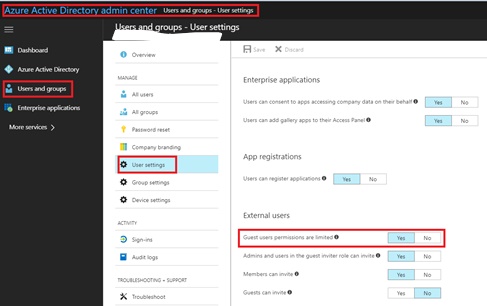
Recent Updates Page 8
Ignite 2018 review
So Ignite has come and gone, and this would of been my 4th Microsoft conference. The overwhelming theme this was was collaboration. You would be hard pressed to find anything that doesn’t tie back into collaboration.
Microsoft it seems really only cares about two productions, and if you don’t tie into those two, you are getting little to no time.
Azure and Office365. They are linking everything in the entire stack back to those two products. The have also even organized all the vendors by how they connect into those platforms.
I really enjoyed the sessions I attended these year, the sessions around the testing of the new AZ exams was incredibility insightful. I tend to agree with Microsoft, make the certification path more job role based vs. overall Microsoft skill.
All I want for for my birthday is….
Microsoft certifications that stop changing names. Here is a rough timeline of how being a professional with Microsoft has been
MCSA
MCSE
MCITP
MCSE
MCSA
Azure Architect
The names have changed back and forth so many times, and I just read yesterday that the names of them are being changed to more job specific titles. Please don’t change your mind again next year. Although I have to admit I do like the newer testing format.
Assigning licenses in O365 via Okta
Recently had to set up Okta assign some O365 licenses. I wasn’t aware at that time, that this also requires me to manage all the Azure AD roles thru Okta as well. This is a pain in the ass.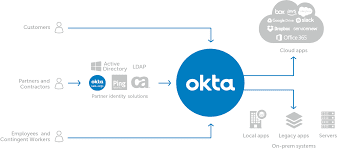
PowerShell for Intune Corp device enrollment
There are a bunch of new corporate device examples in the PowerShell github for Intune
Guy should get an award for updating this, its pretty much exactly what I’ve been looking for
$FileName_CSV = “CorpDeviceIdentifiers” + “_” + $(get-date -f dd-MM-yyyy-H-mm-ss) + “.csv”
$CDI = Get-CorporateDeviceIdentifiers
if($CDI){
foreach($CD in $CDI){
$IDI = $CD.importedDeviceIdentifier
$Desc = $CD.description
Write-Host “Adding ‘$IDI,$Desc’ to ‘$FileName_CSV’…” -ForegroundColor Gray
Add-Content -Value “$IDI,$Desc” -Path “$ExportPath\$FileName_CSV”
}
}
else {
Write-Host “No Corporate Device Identifiers found…” -ForegroundColor Red
}
Write-Host
Okta
I’ve been doing a lot of work with Okta lately. I’ve been doing more and more with IDP’s vendors lately, admittingly, I don’t do as much more with Mobile as I use to.
I did want a place to talk about some of my IDP adventures, so congrats, this is where I am going to write about it.
New InTune User Portal
From Microsoft
User experience update for the Company Portal app for iOS We’ve released a major user experience update to the Company Portal app for iOS. The update features a complete visual redesign that includes a modernized look and feel. We’ve maintained the functionality of the app, but increased its usability and accessibility. You’ll also see: Support for iPhone X. Faster app launch and loading responses, to save users time. Additional progress bars to provide users with the most up-to-date status information. Improvements to the way users upload logs, so if something goes wrong, it’s easier to report.
For awhile now, the Company portal has been lacking behind what you get from MobileIron and airwatch, with the release this week the portal feels more modern. This has been a sorely needed update for awhile now. With a lot of firms moving off of Airwatch and MobileIron when doing Microsoft renewals. We are getting weekly updates from Intune. It surely has come a long way. 
Useful O365 Pro Plus
Useful little script that can help you see which license is applied to a pro plus user.
Get-MsolUser | ? {$_.Licenses.ServiceStatus | ? {$_.ServicePlan.ServiceName -eq “OFFICESUBSCRIPTION” -and $_.ProvisioningStatus -eq “Success”}}
Export to 4k pro plus Version 1711
Cool feature by Microsoft, you can now export to presentations to 4k, this was released in version 1711. Really cool, hopefully some people at the office who I know have asked about this can get some use out of this feature.
Conditional access
I have been working on conditional access rules this week in my test environment. I am planning on trying to sell to my senior leadership a plan to move off traditional MDM and towards an Intune/MAM conditional access setup.
Some of the things I really like about conditional access is the ability to control all of the different client access. I can lock it down to could application type, or domain user etc:
The only real problem I’ve come across is trying to sell this. It is such a huge change, and really requires all or nothing type approach. We will see what the new year brings.
 Peters ramblings