An Open Question to Microsoft: Let Me Get This Straight…

Let’s rewind the tape for a second.

It’s March 2020. The world screeches to a halt. Offices empty out. A grand, unplanned, global experiment in remote work begins. We were told to make it work, and we did. We cobbled together home offices on kitchen tables, mastered the mute button, and learned that “I’m not a cat” is a valid legal defense.

And you know who thrived in this chaos? You, Microsoft.

While the world adapted, you didn’t just survive; you absolutely exploded. Your products became the very bedrock of this new, distributed world.

Teams became the digital office, the school, the family meeting space.
Azure became the beating heart of the cloud infrastructure that kept everything running.
Windows and Office 365 were the essential tools on every single one of those kitchen-table workstations.

And the market noticed. Let’s talk about the report card, because it’s staggering:

  • 2021: You hit $2 trillion in market cap for the first time.
  • 2023: You became only the second company in history to reach a $3 trillion valuation.
  • You’ve posted record-breaking profits, quarter after quarter after quarter, for four consecutive years.

Your stock price tripled. Your revenue soared. You, Microsoft, became the poster child for how a tech giant could not only weather the pandemic but emerge stronger, more valuable, and more essential than ever before.

All of this was achieved by a workforce that was, by and large, not in the office.

Which brings us to today. And the recent mandate. And the question I, and surely thousands of your employees, are asking:

Let me get this straight.

After four years of the most spectacular financial performance in corporate history…
After proving, unequivocally, that your workforce is not just productive but hyper-productive from anywhere…
After leveraging your own technology to enable this very reality and reaping trillions of dollars in value from it…
After telling us that the future of work was flexible, hybrid, and digital…

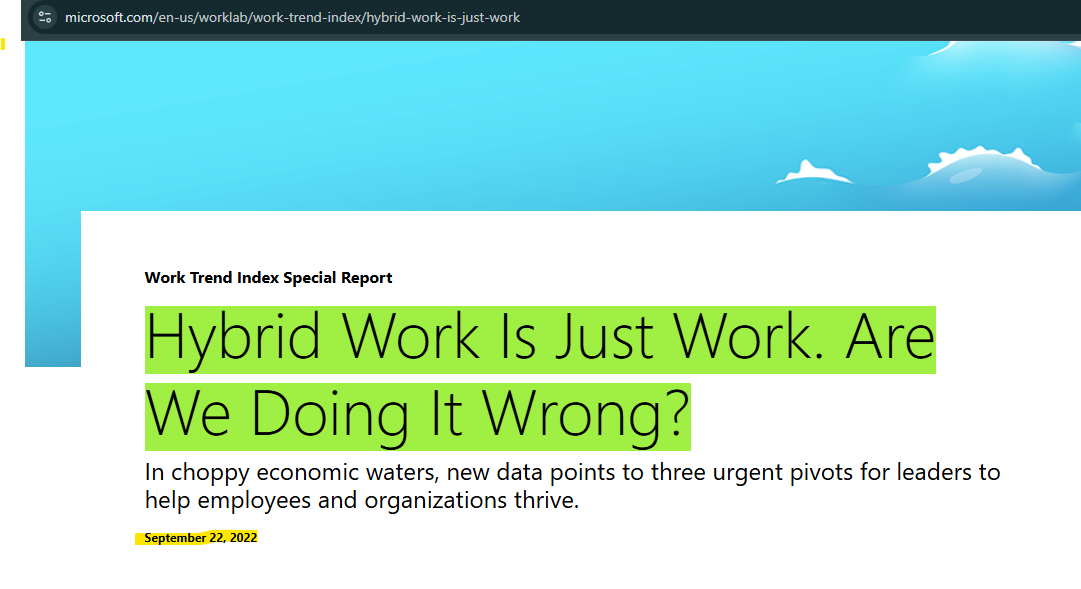
You are now asking people to return to the office for a mandatory three days a week?

What, and I cannot stress this enough, the actual fuck?

Where is the logic? Is this a desperate grasp for a sense of “normalcy” that died in 2020? Is it a silent, cynical ploy to encourage “quiet quitting” and trim the workforce without having to do layoffs? Is it because you’ve sunk billions into beautiful Redmond campuses and feel the existential dread of seeing them sit half-empty?

Because it can’t be about productivity. The data is in, and the data is your own stock price. The proof is in your earnings reports. You have a four-year, multi-trillion-dollar case study that says the work got done, and then some.

It feels like a profound betrayal of the very flexibility you sold the world. It feels like you’re saying, “Our tools empower you to work from anywhere! (Except, you know, from anywhere).”

You built the infrastructure for the future of work and are now mandating the past.

So, seriously, Microsoft. What gives? Is the lesson here that even with all the evidence, all the success, all the innovation, corporate America’s default setting will always, always revert to the illusion of control that a packed office provides?

It’s not just wild. It’s a spectacular disconnect from the reality you yourself helped create. And for a company that prides itself on data-driven decisions, this one seems driven by something else entirely.
Terraform Cloud with Vault

Messing around with Terraform this weekend, I dove into some new functionalities for storing data in HashiCorp Vault, and I was blown away by how much I could automate using Terraform Cloud. The integration between these two tools has helped me automate a lot in my home lab making it more efficient and secure.

Simplifying Secrets Management with Vault

HashiCorp Vault is a powerful tool for securely storing and accessing secrets. It provides a centralized way to manage sensitive data, such as API keys, passwords, and certificates. Vault’s dynamic secrets feature is particularly impressive, allowing for the automatic generation and rotation of secrets. This significantly reduces the risk of secret sprawl and unauthorized access.

Automating Infrastructure with Terraform Cloud

Terraform Cloud is a robust platform for infrastructure as code (IaC) management. It enables teams to collaborate on Terraform configurations, providing a consistent and reliable way to manage infrastructure. Terraform Cloud’s powerful automation capabilities allow for the continuous integration and deployment of infrastructure changes, ensuring that environments are always up-to-date and compliant.

Unleashing the Potential of Terraform Cloud and Vault

Combining Terraform Cloud with HashiCorp Vault has been a game-changer for my projects. Here’s how I utilized these tools over the weekend:

  1. Automated Secrets Storage: Using Terraform Cloud, I automated the process of storing and managing secrets in Vault. This eliminated the manual steps typically required, ensuring that secrets are securely stored and easily accessible when needed.
  2. Dynamic Secret Generation: I leveraged Vault’s ability to generate dynamic secrets, automating the creation of temporary credentials for various services. This not only improved security but also simplified the management of credentials.
  3. Infrastructure Provisioning: With Terraform Cloud, I automated the provisioning of infrastructure components that require access to secrets. By integrating Vault, these components could securely retrieve the necessary credentials without hardcoding them in configuration files.
  4. Policy Management: I used Terraform Cloud to define and manage Vault policies, ensuring that the right permissions were in place for different users and applications. This centralized approach made it easier to enforce security best practices across the board.

Happy automating!

Backing up Pytorch Settings


Backing Up Settings with Python Scripting

PyTorch stands out as one of the most popular frameworks due to its flexibility, ease of use, and dynamic computation graph. Managing settings and configurations across different experiments or projects can sometimes become a cluster f*@%. In this blog, i’ll explain a streamlined approach to managing settings in PyTorch using Python scripting, allowing for easy backup and retrieval of configurations.

Understanding the Importance of Settings Management:

  • In any machine learning project, experimentation involves tweaking various hyperparameters, model architectures, and training configurations.
  • Keeping track of these settings is crucial for reproducibility, debugging, and fine-tuning models.
  • Manual management of settings files or notebooks can lead to errors and inefficiencies, especially when dealing with multiple experiments or collaborators.

Leveraging Python for Settings Backup:

  • Python’s versatility makes it an ideal choice for automating repetitive tasks, such as backing up settings.
  • We can create a script that parses relevant settings from our PyTorch code and stores them in a structured format, such as JSON or YAML.

Designing the Backup Script:

  • Define a function to extract settings from PyTorch code. This may involve parsing configuration files, command-line arguments, or directly accessing variables.
  • Serialize the settings into a suitable format (e.g., JSON).
  • Implement a mechanism for storing the settings, such as saving them to a file or uploading them to a cloud storage service.
  • Optionally, add functionality for restoring settings from a backup.

Here is a good example.

import json

def extract_settings():
# Example: Extract settings from PyTorch code
settings = {
‘learning_rate’: 0.001,
‘batch_size’: 32,
‘num_epochs’: 10,
# Add more settings as needed
}
return settings

def backup_settings(settings, filepath):
with open(filepath, ‘w’) as file:
json.dump(settings, file)

def main():
settings = extract_settings()
backup_settings(settings, ‘settings_backup.json’)
print(“Settings backup complete.”)

if name == “main“:
main()

Vault is not a HSM…

Introduction: In the ever-evolving landscape of data security, understanding the tools at our disposal is crucial. Two such tools, HashiCorp Vault and Hardware Security Modules (HSMs), often get mentioned in the same breath but serve distinctly different purposes. This blog post aims to demystify these technologies, highlighting why a Vault is not an HSM and how they complement each other in securing our digital assets.


What is HashiCorp Vault? HashiCorp Vault is a software-based secrets management solution. It’s designed to handle the storage, access, and management of sensitive data like tokens, passwords, certificates, and encryption keys. Vault’s strengths lie in its versatility and dynamic nature, providing features like:

  • Dynamic Secrets: Generating on-demand credentials that have a limited lifespan, thus minimizing risks associated with static secrets.
  • Encryption as a Service: Allowing applications to encrypt and decrypt data without managing the encryption keys directly.
  • Robust Access Control: Offering a range of authentication methods and fine-grained access policies.

What is a Hardware Security Module (HSM)? An HSM is a physical device focused on protecting cryptographic keys and performing secure cryptographic operations. Key aspects include:

  • Physical Security: Built to be tamper-resistant and safeguard cryptographic keys even in the event of physical attacks.
  • Cryptographic Operations: Specialized in key generation, encryption/decryption, and digital signing, directly within the hardware.
  • Compliance-Ready: Often essential for meeting regulatory standards that require secure key management.

Key Differences:

  1. Nature and Deployment:
    • Vault is a flexible, software-based tool deployable across various environments, including cloud and on-premises.
    • HSMs are physical, tamper-resistant devices, providing a secure environment for cryptographic operations.
  2. Functionality and Scope:
    • Vault excels in managing a wide range of secrets, offering dynamic secrets generation and encryption services.
    • HSMs focus on securing cryptographic keys and performing hardware-based cryptographic functions.
  3. Use Case and Integration:
    • Vault is suitable for organizations needing a comprehensive secrets management system with flexible policies and integrations.
    • HSMs are ideal for scenarios requiring high-assurance key management, often mandated by compliance standards.

Why Vault is Not an HSM: Simply put, Vault is not an HSM because it operates in a different realm of data security. Vault is a software layer providing a broad spectrum of secrets management capabilities. It doesn’t offer the physical security inherent in HSMs but excels in managing access to secrets and encrypting data. Conversely, HSMs provide a hardened, secure environment for cryptographic operations but don’t have the extensive management features of Vault.


Complementary, Not Competitive: In a comprehensive security strategy, Vault and HSMs are not competitors but collaborators. Vault can integrate with HSMs to leverage their physical security for key storage, combining the best of both worlds: the flexibility and extensive management of Vault with the robust, physical security of HSMs.


Guest Access

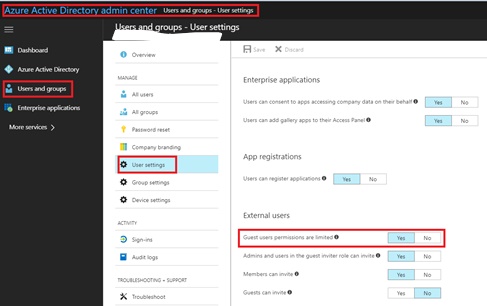
Recently had to do a bunch of research into guest access in Azure AD. One of things I’ve been trying to wrap my head around recently is the move from federation access via legacy ADFS type connections. Moving those over to guest access to B2B. It really fixes some of the trust issues that would happen. It also allows the IAM part of the business to play catch up instead of trusting all domain users for example. I was at ignite this year, and it seemed to be the overall theme. Consuming content how you want to consume, via a B2B, and collaborate on the go. With all the updates to teams we’ve gotten in the last year, I am excited to see what this year has in store.

Ignite 2018 review

So Ignite has come and gone, and this would of been my 4th Microsoft conference.  The overwhelming theme this was was collaboration.  You would be hard pressed to find anything that doesn’t tie back into collaboration.

Microsoft it seems really only cares about two productions, and if you don’t tie into those two, you are getting little to no time.

Azure and Office365. They are linking everything in the entire stack back to those two products.  The have also even organized all the vendors by how they connect into those platforms.

I really enjoyed the sessions I attended these year, the sessions around the testing of the new AZ exams was incredibility insightful.  I tend to agree with Microsoft, make the certification path more job role based vs. overall Microsoft skill.

New InTune User Portal

From Microsoft

User experience update for the Company Portal app for iOS We’ve released a major user experience update to the Company Portal app for iOS. The update features a complete visual redesign that includes a modernized look and feel. We’ve maintained the functionality of the app, but increased its usability and accessibility. You’ll also see: Support for iPhone X. Faster app launch and loading responses, to save users time. Additional progress bars to provide users with the most up-to-date status information. Improvements to the way users upload logs, so if something goes wrong, it’s easier to report.

For awhile now, the Company portal has been lacking behind what you get from MobileIron and airwatch, with the release this week the portal feels more modern. This has been a sorely needed update for awhile now. With a lot of firms moving off of Airwatch and MobileIron when doing Microsoft renewals. We are getting weekly updates from Intune. It surely has come a long way.