
Part 1: Contextual, Attested, and Decentralized Authentication (CADA) for AI MCP Agents

Look, the old ways of auth weren’t built for what’s coming. AI agents don’t live in static sessions or predictable flows—they’re ephemeral, reactive, scattered across clouds, and making decisions faster than your token TTL. So why are we still handing them bearer tokens like it’s 2012? Nothing should be permanent. Context matters. What the agent is doing right now should influence what it’s allowed to do right now. That means proof tied to the moment, not to some long-lived credential you forgot to revoke. It should be rooted in hardware—attested, unforgeable, impossible to rip out and reuse. And above all, it should be decentralized. No single gatekeeper. No single failure point. Trust should move with the agent, like a shadow—provable, portable, disposable. Authentication needs to evolve, or it’ll just be another thing the agents bypass.

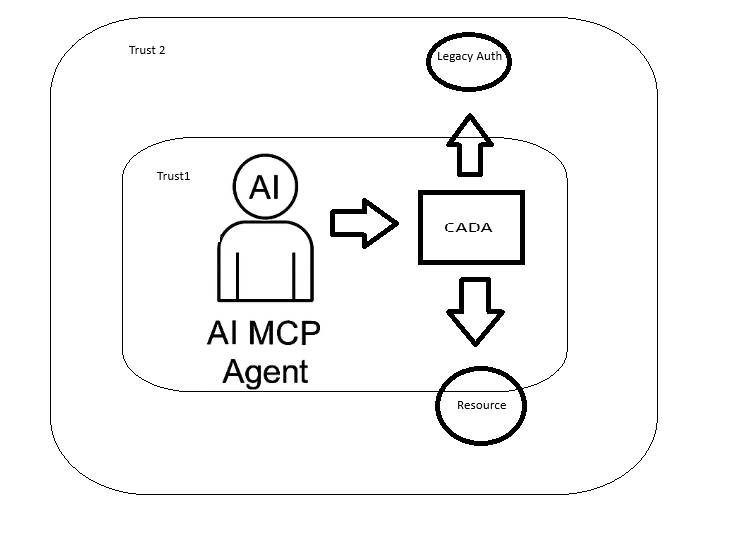
As AI MCP agents evolve into autonomous, multi-tenant actors operating across data planes, trust boundaries, and compute contexts, traditional token-based frameworks like OAuth 2.0 fail to provide the necessary granularity, context-awareness, and runtime verification. CADA introduces a new model for zero-standing privilege, context-aware identity, and attestation-driven trust, leveraging confidential computing and decentralized identity primitives.


Core Pillars

  1. Decentralized Identity Anchors (DID-A)
    • Each MCP agent is assigned a Decentralized Identifier (DID) backed by a verifiable credential (VC).
    • The identity is not centrally registered but anchored in a distributed ledger or verifiable key infrastructure (e.g., SIDetree, Sovrin, or ION).
    • DIDs resolve to metadata including key rotation history, policies, and agent type (exploratory, monitoring, remediation, etc.).
  2. Context-Bound Proof-of-Presence Tokens (CB-PoP)
    • Instead of bearer tokens, agents use signed ephemeral tokens with embedded context:
      • Temporal window (e.g., within the last 30s)
      • Location constraints (verified via confidential enclave attestation)
      • Input/output scope (model state hashes, data fingerprinting)
    • These are validated by services with confidential computing backends using Intel SGX/AMD SEV or AWS Nitro Enclaves.
  3. FIDO2 + TPM/TEE Hardware Anchoring
    • Each agent’s execution environment binds its private signing key to a hardware root of trust, such as TPM or TEE.
    • Authentication occurs via WebAuthn-style challenges, signed inside a secure enclave, with attestation reports validating runtime integrity.
    • Eliminates key export risk and enables remote trust of agent execution context.
  4. Dynamic Trust Contracts (DTC)
    • Each authenticated interaction is governed by a smart contract defining:
      • Data access policies
      • Audit/tracing rules
      • Time-limited execution permissions
      • Revocation semantics based on real-time observability inputs
    • These contracts are cryptographically signed by the MCP owner and verified prior to execution.
  5. Zero Standing Privilege with Just-In-Time Delegation
    • Agents do not persist access tokens.
    • Authorization is granted at runtime through delegated trust, using time-bound, task-specific credentials derived from identity and context proof.

Authentication Flow Example

  1. Agent Bootstraps Identity
    • Generates ephemeral DID linked to owner’s permanent identity
    • Signs its public key using its hardware-anchored root
  2. Agent Requests Access to Service
    • Prepares CB-PoP: signs request metadata, timestamps, hash of recent model inputs, and enclave measurement
    • Attaches DID and enclave attestation proof
  3. Service Validates Request
    • Resolves DID and verifies VC chain
    • Confirms enclave integrity and CB-PoP freshness
    • Checks smart contract for permission rules
  4. Access Granted
    • Service encrypts data with agent’s public key (ensuring only that enclave can decrypt)
    • Transaction is logged immutably with context metadata
Why It’s Better than OAuth

FeatureOAuth 2.0CADA
Agent IdentityStatic Client IDDynamic, Decentralized DID
Trust ModelPredefined ScopesRuntime Context + Attestation
Token SecurityBearerEphemeral, Context-bound, Non-exportable
Privilege ModelLong-lived AccessZero-standing Privilege
RevocationManual / OpaqueSmart Contracts, Observable Context


I started to write some stuff last night in Rust, I'll get this up in Github in the next few days.

Generate a Decentralized Identity (DID)


use ssi::did::DIDMethod;
use ssi::did_resolve::DIDResolver;
use ssi::jwk::{JWK, Params as JWKParams};
use ssi::vc::URI;

fn generate_did() -> Result<(), Box<dyn std::error::Error>> {
    let jwk = JWK {
        params: JWKParams::OKP(ssi::jwk::OctetParams {
            curve: "Ed25519".to_string(),
            public_key: vec![],
            private_key: Some(vec![]), // Generate ephemeral keypair
        }),
        ..Default::default()
    };

    let did = ssi::did::did_key::DIDKey.generate(&jwk)?;
    println!("Generated DID: {}", did);
    Ok(())
}

Bind Key to Hardware (e.g. TPM or Nitro Enclave)


use tss_esapi::Context;
use tss_esapi::structures::{Auth, Public};

fn generate_tpm_bound_key() -> Result<(), Box<dyn std::error::Error>> {
    let mut context = Context::new(Default::default())?;
    let key_auth = Auth::try_from(vec![0u8; 32])?;

    let public = Public::rsa_encrypt_decrypt_key(/* your key parameters here */);
    let (key_handle, _) = context.create_primary(public, key_auth)?;
    println!("Key generated and bound to TPM context.");
    Ok(())
}

Create a Context-Bound Proof Token (CB-PoP)
use chrono::Utc;
use ring::signature::{Ed25519KeyPair, KeyPair};
use serde_json::json;

fn create_cb_pop(agent_id: &str, model_digest: &str, enclave_measurement: &str) -> String {
    let now = Utc::now().timestamp();

    let token = json!({
        "agent_id": agent_id,
        "timestamp": now,
        "context": {
            "model_state_hash": model_digest,
            "enclave": enclave_measurement
        }
    });

    // Sign it using an ephemeral keypair inside enclave or bound to TPM
    let keypair = Ed25519KeyPair::from_pkcs8(&get_private_key_bytes()).unwrap();
    let signature = keypair.sign(token.to_string().as_bytes());

    json!({
        "token": token,
        "signature": base64::encode(signature.as_ref())
    }).to_string()
}
Smart Contract

use ethers::prelude::*;
use std::sync::Arc;

#[tokio::main]
async fn validate_contract_permission(agent_id: String) -> Result<(), Box<dyn std::error::Error>> {
    let provider = Provider::<Http>::try_from("https://mainnet.infura.io/v3/YOUR_PROJECT_ID")?;
    let client = Arc::new(SignerMiddleware::new(provider, Wallet::from(...)));

    let contract = Contract::new("0xYourContractAddress", contract_abi, client);
    let is_allowed: bool = contract.method::<_, bool>("isAuthorized", agent_id)?.call().await?;
    println!("Access allowed: {}", is_allowed);
    Ok(())
}
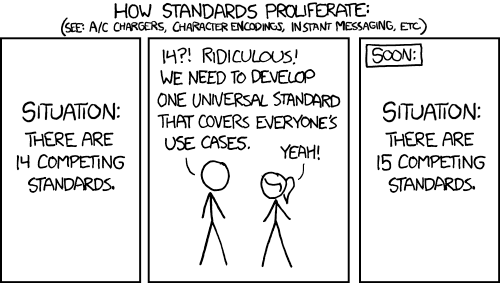
Implementing OAuth with an MCP (Model Context Protocol) AI Test Server: A Technical Deep Dive

I wasn’t really sure I even wanted to write this up — mostly because there are some limitations in MCP that make things a little… awkward. But I figured someone else is going to hit the same wall eventually, so here we are.

If you’re trying to use OAuth 2.0 with MCP, there’s something you should know: it doesn’t support the full OAuth framework. Not even close.

MCP only works with the default well-known endpoints:

  • /.well-known/openid-configuration
  • /.well-known/oauth-authorization-server

Before we get going, let me write this in the biggest and most awkward text I can find.

Run the Device Flow outside of MCP, then inject the token into the session manually.

And those have to be hosted at the default paths, on the same domain as the issuer. If you’re using split domains, custom paths, or a setup where your metadata lives somewhere else (which is super common in enterprise environments)… tough luck. There’s no way to override the discovery URL.

It also doesn’t support other flows like device_code, jwt_bearer, or anything that might require pluggable negotiation. You’re basically stuck with the default authorization code flow, and even that assumes everything is laid out exactly the way it expects.

So yeah — if you’re planning to hook MCP into a real-world OAuth deployment, just be aware of what you’re signing up for. I wish this part of the protocol were a little more flexible, but for now, it’s pretty locked down.

Model Context Protocol (MCP) is an emerging standard for AI model interaction that provides a unified interface for working with various AI models. When implementing OAuth with an MCP test server, we’re dealing with a specialized scenario where authentication and authorization must accommodate both human users and AI agents.

This technical guide covers the implementation of OAuth 2.0 in an MCP environment, focusing on the unique requirements of AI model authentication, token exchange patterns, and security considerations specific to AI workflows.

Prerequisites

Before implementing OAuth with your MCP test server:

  1. MCP Server Setup: A running MCP test server (v0.4.0 or later)
  2. Developer Credentials: Client ID and secret from the MCP developer portal
  3. OpenSSL: For generating key pairs and testing JWT signatures
  4. Understanding of MCP’s Auth Requirements: Familiarity with MCP’s auth extensions for AI contexts

Section 1: MCP-Specific OAuth Configuration

1.1 Registering Your Application

MCP extends standard OAuth with AI-specific parameters:

curl -X POST https://auth.modelcontextprotocol.io/register \
  -H "Content-Type: application/json" \
  -d '{
    "client_name": "Your AI Agent",
    "client_type": "ai_service",  # MCP-specific client type
    "grant_types": ["authorization_code", "client_credentials"],
    "redirect_uris": ["https://your-domain.com/auth/callback"],
    "scopes": ["mc:inference", "mc:fine_tuning"],  # MCP-specific scopes
    "ai_metadata": {  # MCP extension
      "model_family": "your-model-family",
      "capabilities": ["text-generation", "embeddings"]
    }
  }'

1.2 Understanding MCP’s Auth Flows

MCP supports three primary OAuth flows:

  1. Standard Authorization Code Flow: For human users interacting with MCP via UI
  2. Client Credentials Flow: For server-to-server AI service authentication (sucks, doesn’t work, even the work arounds, don’t do it)
  3. Device Flow: For headless AI environments

Section 2: Implementing Authorization Code Flow

2.1 Building the Authorization URL

MCP extends standard OAuth parameters with AI context:

from urllib.parse import urlencode

auth_params = {
    'response_type': 'code',
    'client_id': 'your_client_id',
    'redirect_uri': 'https://your-domain.com/auth/callback',
    'scope': 'openid mc:inference mc:models:read',
    'state': 'anti-csrf-token',
    'mcp_context': json.dumps({  # MCP-specific context
        'model_session_id': 'current-session-uuid',
        'intended_use': 'interactive_chat'
    }),
    'nonce': 'crypto-random-string'
}

auth_url = f"https://auth.modelcontextprotocol.io/authorize?{urlencode(auth_params)}"

2.2 Handling the Callback

The MCP authorization server will return additional AI context in the callback:

@app.route('/auth/callback')
def callback():
    auth_code = request.args.get('code')
    mcp_context = json.loads(request.args.get('mcp_context', '{}'))  # MCP extension

    token_response = requests.post(
        'https://auth.modelcontextprotocol.io/token',
        data={
            'grant_type': 'authorization_code',
            'code': auth_code,
            'redirect_uri': 'https://your-domain.com/auth/callback',
            'client_id': 'your_client_id',
            'client_secret': 'your_client_secret',
            'mcp_context': request.args.get('mcp_context')  # Pass context back
        }
    )

    # MCP tokens include AI-specific claims
    id_token = jwt.decode(token_response.json()['id_token'], verify=False)
    print(f"Model Session ID: {id_token['mcp_session_id']}")
    print(f"Allowed Model Operations: {id_token['mcp_scopes']}")

Section 3: Client Credentials Flow for AI Services

3.1 Requesting Machine-to-Machine Tokens

import requests

response = requests.post(
    'https://auth.modelcontextprotocol.io/token',
    data={
        'grant_type': 'client_credentials',
        'client_id': 'your_client_id',
        'client_secret': 'your_client_secret',
        'scope': 'mc:batch_inference mc:models:write',
        'mcp_assertion': generate_mcp_assertion_jwt()  # MCP requirement
    },
    headers={'Content-Type': 'application/x-www-form-urlencoded'}
)

token_data = response.json()
# MCP includes additional AI context in the response
model_context = token_data.get('mcp_model_context', {})

3.2 Generating MCP Assertion JWTs

MCP requires a signed JWT assertion for client credentials flow:

import jwt
import datetime

def generate_mcp_assertion_jwt():
    now = datetime.datetime.utcnow()
    payload = {
        'iss': 'your_client_id',
        'sub': 'your_client_id',
        'aud': 'https://auth.modelcontextprotocol.io/token',
        'iat': now,
        'exp': now + datetime.timedelta(minutes=5),
        'mcp_metadata': {  # MCP-specific claims
            'model_version': '1.2.0',
            'deployment_env': 'test',
            'requested_capabilities': ['inference', 'training']
        }
    }

    with open('private_key.pem', 'r') as key_file:
        private_key = key_file.read()

    return jwt.encode(payload, private_key, algorithm='RS256')

Section 4: MCP Token Validation

4.1 Validating ID Tokens

MCP ID tokens include standard OIDC claims plus MCP extensions:

from jwt import PyJWKClient
from jwt.exceptions import InvalidTokenError

def validate_mcp_id_token(id_token):
    jwks_client = PyJWKClient('https://auth.modelcontextprotocol.io/.well-known/jwks.json')

    try:
        signing_key = jwks_client.get_signing_key_from_jwt(id_token)
        decoded = jwt.decode(
            id_token,
            signing_key.key,
            algorithms=['RS256'],
            audience='your_client_id',
            issuer='https://auth.modelcontextprotocol.io'
        )

        # Validate MCP-specific claims
        if not decoded.get('mcp_session_id'):
            raise InvalidTokenError("Missing MCP session ID")

        return decoded
    except Exception as e:
        raise InvalidTokenError(f"Token validation failed: {str(e)}")

4.2 Handling MCP Token Introspection

def introspect_mcp_token(token):
    response = requests.post(
        'https://auth.modelcontextprotocol.io/token/introspect',
        data={
            'token': token,
            'client_id': 'your_client_id',
            'client_secret': 'your_client_secret'
        }
    )

    introspection = response.json()
    if not introspection['active']:
        raise Exception("Token is not active")

    # Check MCP-specific introspection fields
    if 'mc:inference' not in introspection['scope'].split():
        raise Exception("Missing required inference scope")

    return introspection

Section 5: MCP-Specific Considerations

5.1 Handling Model Session Context

MCP tokens include session context that must be propagated:

def call_mcp_api(endpoint, access_token):
    headers = {
        'Authorization': f'Bearer {access_token}',
        'X-MCP-Context': json.dumps({
            'session_continuity': True,
            'model_temperature': 0.7,
            'max_tokens': 2048
        })
    }

    response = requests.post(
        f'https://api.modelcontextprotocol.io/{endpoint}',
        headers=headers,
        json={'prompt': 'Your AI input here'}
    )

    return response.json()

5.2 Token Refresh with MCP Context

def refresh_mcp_token(refresh_token, mcp_context):
    response = requests.post(
        'https://auth.modelcontextprotocol.io/token',
        data={
            'grant_type': 'refresh_token',
            'refresh_token': refresh_token,
            'client_id': 'your_client_id',
            'client_secret': 'your_client_secret',
            'mcp_context': json.dumps(mcp_context)
        }
    )

    if response.status_code != 200:
        raise Exception(f"Refresh failed: {response.text}")

    return response.json()

Section 6: Testing and Debugging

6.1 Using MCP’s Test Token Endpoint

curl -X POST https://test-auth.modelcontextprotocol.io/token \
  -H "Content-Type: application/x-www-form-urlencoded" \
  -d "grant_type=client_credentials" \
  -d "client_id=test_client" \
  -d "client_secret=test_secret" \
  -d "scope=mc:test_all" \
  -d "mcp_test_mode=true" \
  -d "mcp_override_context={\"bypass_limits\":true}"

6.2 Analyzing MCP Auth Traces

Enable MCP debug headers:

headers = {
    'Authorization': 'Bearer test_token',
    'X-MCP-Debug': 'true',
    'X-MCP-Traceparent': '00-0af7651916cd43dd8448eb211c80319c-b7ad6b7169203331-01'
}

Why did this suck so much?

Implementing OAuth with an MCP test server requires attention to MCP’s AI-specific extensions while following standard OAuth 2.0 patterns. Key takeaways:

  1. Always include MCP context parameters in auth flows
  2. Validate MCP-specific claims in tokens
  3. Propagate session context through API calls
  4. Leverage MCP’s test endpoints during development

For production deployments, ensure you:

  • Rotate keys and secrets regularly
  • Monitor token usage patterns
  • Implement proper scope validation
  • Handle MCP session expiration gracefully