Reviewing updates for Teams

I really like the new reactions in teams.  Although, I am growing tired of the comparison to Slack.  Every time Microsoft drops a new feature in Teams, the pundits say the same thing “Slack already does that”


Well you know what slack doesn’t do?

PowerPoint, Word, Office, Email, single pane of glass work experience….but regardless

 

And finally from last month…..


Announcements. This is actually quite a cool feature that I think this is quite a cool feature that doesn’t get nearly enough usage.


An announcement-style message in a channel

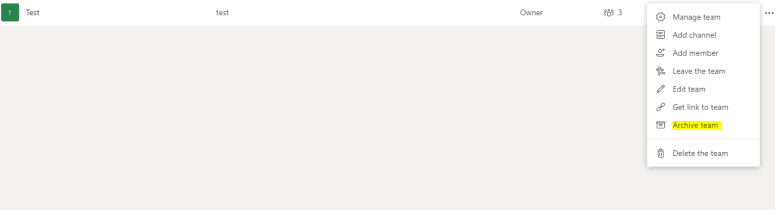
How to archive a team correctly

  1. From Teams, select the manage icon in the lower left hand corner

    1. Teams1
  2. Select the team on the right hand side that you want to Archive

    teams2

Archiving is a great feature for searching for content later, at my firm one of the first problems with had with teams is retention, what type of controls do we have.  Be very careful with the delete team here.


More information on searching thru an archive.

To view and search through the content of the archived team, click its name in the Archived list. Or, make it a favorite if you think you’ll refer to it often (in the list, select the team, then More options More options button > Favorite).

All of the team activity is frozen once the team is archived. No one will be able to start new conversations or reply to posts in a channel, add or remove channels, edit team settings, or add apps. As a team owner, you’ll still be able to add or remove members, update roles, and delete, renew, or restore an archived team.

Teams to be included in all O365 Business installs

Currently, Microsoft Teams is a separate installation from Office 365 Business. But, starting in January 2019, Teams will be installed by default for new installations of Office 365 Business, starting with Version 1901.

I saw this on twitter this morning and I thought it was really interesting. I’ve written before about how I think the O365 stack wins when you put it up against other individual technologies.  It seems apparent that Microsoft see this as well.  Good stuff.