There’s a war going on inside me, and it’s fought in terminal commands and neural networks.
On one hand, I am euphoric. The gates have been blown wide open. For decades, the biggest barrier to entry for Linux wasn’t the technology itself—it was the gatekeeping, the assumed knowledge, the sheer terror of being a “moron” in a world of geniuses. You’d fumble with a driver, break your X server, and be met not with a helpful error message, but with a cryptic string of text that felt like the system mocking you.
But now? AI has changed the game. That same cryptic error message can be pasted into a chatbot and, in plain English, you get a step-by-step guide to fix it. You can ask, “How do I set up a development environment for Python on Ubuntu?” and get a coherent, working answer. The barrier of “having to already be an expert to become an expert” is crumbling. It’s a beautiful thing. I want to throw the doors open and welcome everyone in. The garden is no longer a walled fortress; it’s a public park, and I want to be the guy handing out maps.
But the other part of my heart, the older, more grizzled part, is defensive. It’s protective. It feels a pang of something I can’t fully explain when I see this new, frictionless entry.
Because Linux, for me, wasn’t frictionless. It was friction that saved my life.
I was a kid when I first booted into a distribution I’d burned onto a CD-R. It was clunky. It was slow. Nothing worked out of the box. But for a kid who felt out of place, who was searching for a sense of agency and control in a confusing world, it was a revelation. Here was a system that didn’t treat me like a consumer. It treated me like a participant. It demanded that I learn, that I struggle, that I understand.
Fixing that broken X server wasn’t just a task; it was a trial by fire. Getting a sound card to work felt like summiting a mountain. Every problem solved was a dopamine hit earned through sheer grit and persistence. I wasn’t just using a computer; I was communicating with it. I was learning its language. In a world that often felt chaotic and hostile, the terminal was a place of logic. If you learned the rules, you could make it obey. You could build things. You could break things, and more importantly, you could fix them.
That process—the struggle—forged me. It taught me problem-solving, critical thinking, and a deep, fundamental patience. It gave me a confidence that came not from being told I was smart, but from proving it to myself by conquering a system that asked no quarter and gave none. In many ways, the command line was my first therapist. It was a space where my problems had solutions, even if I had to dig for them.
So when I see AI effortlessly dismantling those very same struggles, I feel a strange, irrational bias. It’s the bias of a veteran who remembers the trenches, looking at new recruits with high-tech gear. A part of me whispers, “They didn’t earn their stripes. They don’t know what it truly means.”
I know this is a fallacy. It’s the “I walked uphill both ways in the snow” of our community. The goal was never the suffering; the goal was the empowerment. If AI can deliver that empowerment without the unnecessary pain, that is a monumental victory.
But my love for Linux is tangled up in that pain. It’s personal. It’s the technology that literally saved me by giving me a world I could control and a community I could belong to. I am defensive of it because it’s a part of my identity. I feel a need to protect its history, its spirit, and the raw, hands-on knowledge that feels sacred to me.
So here I am, split.
One hand is extended, waving newcomers in, thrilled to see the community grow and evolve in ways I never dreamed possible. “Come on in! The water’s fine! Don’t worry, the AI lifeguard is on duty.”
The other hand is clenched, resting protectively on the old, heavy textbooks and the logs of a thousand failed compile attempts, guarding the memory of the struggle that shaped me.
Perhaps the reconciliation is in understanding that the soul of Linux was never the difficulty. It was the freedom, the curiosity, and the empowerment. The tools are just changing. The spirit of a kid in a bedroom, staring at a blinking cursor, ready to tell the machine what to do—that remains. And if AI helps more people find that feeling, then maybe my defensive, split heart can finally find peace.
The gates are down. The garden is open. And I’ll be here, telling stories about the old walls, even as I help plant new flowers for everyone to enjoy.
It’s March 2020. The world screeches to a halt. Offices empty out. A grand, unplanned, global experiment in remote work begins. We were told to make it work, and we did. We cobbled together home offices on kitchen tables, mastered the mute button, and learned that “I’m not a cat” is a valid legal defense.
And you know who thrived in this chaos? You, Microsoft.
While the world adapted, you didn’t just survive; you absolutely exploded. Your products became the very bedrock of this new, distributed world.
Teams became the digital office, the school, the family meeting space. Azure became the beating heart of the cloud infrastructure that kept everything running. Windows and Office 365 were the essential tools on every single one of those kitchen-table workstations.
And the market noticed. Let’s talk about the report card, because it’s staggering:
2021: You hit $2 trillion in market cap for the first time.
2023: You became only the second company in history to reach a $3 trillion valuation.
You’ve posted record-breaking profits, quarter after quarter after quarter, for four consecutive years.
Your stock price tripled. Your revenue soared. You, Microsoft, became the poster child for how a tech giant could not only weather the pandemic but emerge stronger, more valuable, and more essential than ever before.
All of this was achieved by a workforce that was, by and large, not in the office.
Which brings us to today. And the recent mandate. And the question I, and surely thousands of your employees, are asking:
Let me get this straight.
After four years of the most spectacular financial performance in corporate history… After proving, unequivocally, that your workforce is not just productive but hyper-productive from anywhere… After leveraging your own technology to enable this very reality and reaping trillions of dollars in value from it… After telling us that the future of work was flexible, hybrid, and digital…
You are now asking people to return to the office for a mandatory three days a week?
What, and I cannot stress this enough, the actual fuck?
Where is the logic? Is this a desperate grasp for a sense of “normalcy” that died in 2020? Is it a silent, cynical ploy to encourage “quiet quitting” and trim the workforce without having to do layoffs? Is it because you’ve sunk billions into beautiful Redmond campuses and feel the existential dread of seeing them sit half-empty?
Because it can’t be about productivity. The data is in, and the data is your own stock price. The proof is in your earnings reports. You have a four-year, multi-trillion-dollar case study that says the work got done, and then some.
It feels like a profound betrayal of the very flexibility you sold the world. It feels like you’re saying, “Our tools empower you to work from anywhere! (Except, you know, from anywhere).”
You built the infrastructure for the future of work and are now mandating the past.
So, seriously, Microsoft. What gives? Is the lesson here that even with all the evidence, all the success, all the innovation, corporate America’s default setting will always, always revert to the illusion of control that a packed office provides?
It’s not just wild. It’s a spectacular disconnect from the reality you yourself helped create. And for a company that prides itself on data-driven decisions, this one seems driven by something else entirely.
I wasn’t really sure I even wanted to write this up — mostly because there are some limitations in MCP that make things a little… awkward. But I figured someone else is going to hit the same wall eventually, so here we are.
If you’re trying to use OAuth 2.0 with MCP, there’s something you should know: it doesn’t support the full OAuth framework. Not even close.
MCP only works with the default well-known endpoints:
/.well-known/openid-configuration
/.well-known/oauth-authorization-server
Before we get going, let me write this in the biggest and most awkward text I can find.
Run the Device Flow outside of MCP, then inject the token into the session manually.
And those have to be hosted at the default paths, on the same domain as the issuer. If you’re using split domains, custom paths, or a setup where your metadata lives somewhere else (which is super common in enterprise environments)… tough luck. There’s no way to override the discovery URL.
It also doesn’t support other flows like device_code, jwt_bearer, or anything that might require pluggable negotiation. You’re basically stuck with the default authorization code flow, and even that assumes everything is laid out exactly the way it expects.
So yeah — if you’re planning to hook MCP into a real-world OAuth deployment, just be aware of what you’re signing up for. I wish this part of the protocol were a little more flexible, but for now, it’s pretty locked down.
Model Context Protocol (MCP) is an emerging standard for AI model interaction that provides a unified interface for working with various AI models. When implementing OAuth with an MCP test server, we’re dealing with a specialized scenario where authentication and authorization must accommodate both human users and AI agents.
This technical guide covers the implementation of OAuth 2.0 in an MCP environment, focusing on the unique requirements of AI model authentication, token exchange patterns, and security considerations specific to AI workflows.
Prerequisites
Before implementing OAuth with your MCP test server:
MCP Server Setup: A running MCP test server (v0.4.0 or later)
Developer Credentials: Client ID and secret from the MCP developer portal
OpenSSL: For generating key pairs and testing JWT signatures
Understanding of MCP’s Auth Requirements: Familiarity with MCP’s auth extensions for AI contexts
Section 1: MCP-Specific OAuth Configuration
1.1 Registering Your Application
MCP extends standard OAuth with AI-specific parameters:
Implementing OAuth with an MCP test server requires attention to MCP’s AI-specific extensions while following standard OAuth 2.0 patterns. Key takeaways:
Always include MCP context parameters in auth flows
Validate MCP-specific claims in tokens
Propagate session context through API calls
Leverage MCP’s test endpoints during development
For production deployments, ensure you:
Rotate keys and secrets regularly
Monitor token usage patterns
Implement proper scope validation
Handle MCP session expiration gracefully
Pete
3:28 am on June 24, 2025 Tags: linux ( 2 ), NUMA, Technology
So here’s a weird rabbit hole I went down recently: trying to figure out why Linux memory allocation slows to a crawl under pressure — especially on big multi-socket systems with a ton of cores. The culprit? Good ol’ SLUB. And no, I don’t mean a rude insult — I mean the SLUB allocator, one of the core memory allocators in the Linux kernel.
If you’ve ever profiled a high-core-count server under load and seen strange latency spikes in malloc-heavy workloads, there’s a good chance SLUB contention is part of it.
The Setup
Let’s say you’ve got a 96-core AMD EPYC box. It’s running a real-time app that’s creating and destroying small kernel objects like crazy — maybe TCP connections, inodes, structs for netlink, whatever.
Now, SLUB is supposed to be fast. It uses per-CPU caches so that you don’t have to lock stuff most of the time. Allocating memory should be a lockless, per-CPU bump pointer. Great, right?
Until it’s not.
The Problem: The Slow Path of Doom
When the per-CPU cache runs dry (e.g., under memory pressure or fragmentation), you fall into the slow path, and that’s where things get bad:
SLUB hits a global or per-node lock (slub_lock) to refill the cache.
If your NUMA node is short on memory, it might fallback to a remote node — so now you’ve got cross-node memory traffic.
Meanwhile, other cores are trying to do the same thing. Boom: contention.
Add slab merging and debug options like slub_debug into the mix, and now you’re in full kernel chaos mode.
If you’re really unlucky, your allocator calls will stall behind a memory compaction or even trigger the OOM killer if it can’t reclaim fast enough.
Why This Is So Hard
This isn’t just “optimize your code” kind of stuff — this is deep down in mm/slub.c, where you’re juggling:
Atomic operations in interrupt contexts
Per-CPU vs. global data structures
Memory locality vs. system-wide reclaim
The fact that one wrong lock sequence and you deadlock the kernel
There are tuning knobs (/proc/slabinfo, slub_debug, etc.), but they’re like trying to steer a cruise ship with a canoe paddle. You might see symptoms, but fixing the cause takes patching and testing on bare metal.
Things I’m Exploring
Just for fun (and pain), I’ve been poking around the idea of:
Introducing NUMA-aware slab refill batching, so we reduce cross-node fallout.
Using BPF to trace slab allocation bottlenecks live (if you haven’t tried this yet, it’s surprisingly helpful).
Adding a kind of per-node, per-type draining system where compaction and slab freeing can happen more asynchronously.
Not gonna lie — some of this stuff is hard. It’s race-condition-central, and the kind of thing where adding one optimization breaks five other things in edge cases you didn’t know existed.
SLUB is amazing when it works. But when it doesn’t — especially under weird multi-core, NUMA, low-memory edge cases — it can absolutely wreck your performance.
And like most things in the kernel, the answer isn’t always “fix it” — sometimes it’s “understand what it’s doing and work around it.” Until someone smarter than me upstreams a real solution.
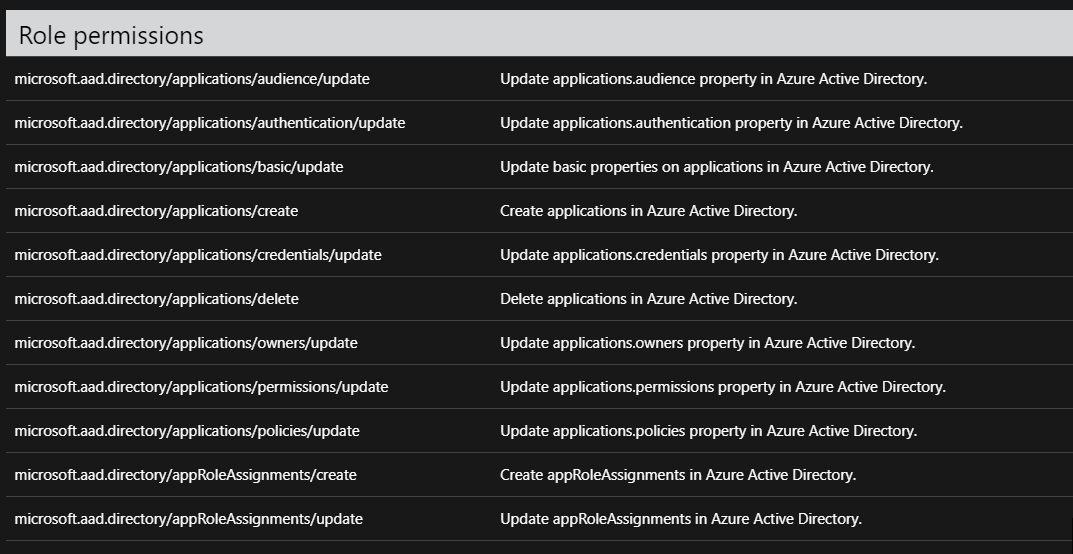
So I’ve been wanting to write about this for some time now. For the longest time, I’ve managed our Azure AD. The problem came in when it came to setting up new application registrations. You needed entirely too powerful of permissions to set up these registrations. It was a nightmare, because I found myself on calls setting up these registrations for no reason. I asked a few folks at Ignite about this, and Microsoft assured myself and others that they were working on it. The following Ignite ( This year) they released an update to Azure AD roles.
I am not even entirely sure you can understand how painful this was as a Directory architect. Having the ability to selectively allow people to create applications registrations allows me to automate so many workflows.
Good job Microsoft
Pete
7:10 pm on April 16, 2013 Tags: computer, management protocol, manual startup, powershell, software, Technology
So I have had the pleasure (sarcasm, massive amounts of sarcasm) in dealing with remote power shell in the last couple of days So I figured I would write a quick guide on how you can connect to another machine, outside of your domain, with remote Power shell. This is useful if you want to run Exchange cmdlets from your local machine, run tests on your local power shell instance while connecting to a test lab, or countless other ways. First lets talk about remote power shell, and what it is.
Remote power shell is a tool that allows you to remotely managed services using WS-Management protocol and the Windows Remote Management (WinRM) service. The WS-Management protocol is a public standard for remotely exchanging management data with any computer device that implements the protocol. The WinRM service processes WSMan requests received over the network. It uses HTTP.sys to listen on the network.
In my test scenario, I am trying to connect to my test lab (testlab.com) with remote powershell, from my work machine (workdomain.com) The first problem that I am going to come across is that my machines are in different domains, and we are not going to be able to create a trust between them. I found a great KB that walked me through the actual technical piece.
I have listed those steps here
1. Start Windows PowerShell as an administrator by right-clicking the Windows PowerShell shortcut and selecting Run As Administrator.
2. The WinRM service is confi gured for manual startup by default. You must change the startup type to Automatic and start the service on each computer you want to work with. At the PowerShell prompt, you can verify that the WinRM service is running using the following command: get-service winrm
The value of the Status property in the output should be “Running”.
3. To configure Windows PowerShell for remoting, type the following command: Enable-PSRemoting –force
In many cases, you will be able to work with remote computers in other domains. However, if the remote computer is not in a trusted domain, the remote computer might not be able to authenticate your credentials. To enable authentication, you need to add the remote computer to the list of trusted hosts for the local computer in WinRM. To do so, type: winrm s winrm/config/client ‘@{TrustedHosts=”RemoteComputer”}’
Here, RemoteComputer should be the name of the remote computer, such as: winrm s winrm/config/client ‘@{TrustedHosts=”CorpServer56″}’
A few problems that I came across.
Even after adding the machine to the trusted hosts, you still get the same errors inside power shell that says unable to connect. Make sure you are running power shell as an administrator
Make sure you can ping and telnet the ports you are using
Make sure that if your going over HTTP that the server your connecting to has the turned on, for example,if your going to connect to an Exchange server for remote power shell, make sure that IIS directory allows connections on port 80
Pete
6:34 pm on April 15, 2013 Tags: Technology, The future
In 20 or 30 years, you’ll be able to hold in your hand as much computing knowledge as exists now in the whole city, or even the whole world.
It is such a crazy world we live in, today I have been troubleshooting my brother’s 32GB SD card. Think about that for a second, I am holding a 32 GB SD card, that 20 years ago, wasn’t even possible to create in such small space. The miracles of technology.



 Peters ramblings